| Author |
Message |
Forum: Feature Requests Topic: 100% transparent taskbar @ Win7? |
| Splitwirez |
|
Posted: Fri Oct 09, 2015 3:34 am
|
|
Replies: 6
Views: 3282
|
ZoNi wrote: Yes, I have tried that (with Res Hacker), but I just can't find what image to replace 
I found it hard to do, too. Just keep in mind, the image only includes the trim you want to get rid of, not the actual glassy part .-. |
|
 |
Forum: Feature Requests Topic: 100% transparent taskbar @ Win7? |
| Splitwirez |
|
Posted: Wed Sep 30, 2015 11:26 am
|
|
Replies: 6
Views: 3282
|
ZoNi wrote: Yes? How?
Just replace the taskbar image with one that looks as you want it.
Sorry for the late reply, I really need to start checking here more often .-. |
|
|
Forum: Feature Requests Topic: Almost Vista style shutdown button...help? |
| Splitwirez |
|
Posted: Fri Sep 18, 2015 2:37 am
|
|
Replies: 5
Views: 1558
|
| The problem is not how to add 2 icons to the button. If that's what you want, there are ways to cheat it. The problem is how to make 2 independent buttons that do different things (plus the arrow). Axtually, I don't care about it functioning like Vista, I just want it to look the part, un-squished.... |
|
|
Forum: Feature Requests Topic: Almost Vista style shutdown button...help? |
| Splitwirez |
|
Posted: Thu Sep 17, 2015 6:59 pm
|
|
Replies: 5
Views: 1558
|
|
|
Forum: Feature Requests Topic: Almost Vista style shutdown button...help? |
| Splitwirez |
|
Posted: Thu Sep 17, 2015 6:45 pm
|
|
Replies: 5
Views: 1558
|
| You folks told me I'd never have a Vista shutdown button. Now, I'm -1cm of padding away from proving you dead wrong about YOUR OWN SOFTWARE !!! :lol: http://www.mediafire.com/convkey/b753/oobd5brk7jr058rzg.jpg?size_id=6 Here's the skin itself: VISTA SKIN ...ALMOST... Problem is, the button is gettin... |
|
|
Forum: Feature Requests Topic: 100% transparent taskbar @ Win7? |
| Splitwirez |
|
Posted: Thu Sep 17, 2015 11:46 am
|
|
Replies: 6
Views: 3282
|
| Well, for a long time I use Taskbar Blur Toggle, http://dblake1.deviantart.com/art/Taskbar-Blur-Toggle-0-2-0-412358153 It is great little program, but I would like to remove that upper line (edge) of taskbar - see screenshot: http://i.imgur.com/stvtjM3l.jpg Other than that line, everything is nice ... |
|
|
Forum: Start Menu Skins Topic: Vista Beta (Win7 style) & Blue Max (Classic, Win7 style) |
| Splitwirez |
|
Posted: Tue Sep 08, 2015 12:08 pm
|
|
Replies: 30
Views: 15971
|
| Hay, Splitwirez. Picked up that Mexican saying from somewhere. Just comparing you to the best taco ever. About the transplant. I would much rather you, do the replacing of your beta frame. Think of it like this. If I have say, size 10 narrow shoe. You have say, basketball player size 16 wide shoe. ... |
|
|
Forum: Start Menu Skins Topic: Skin request |
| Splitwirez |
|
Posted: Mon Sep 07, 2015 10:12 am
|
|
Replies: 25
Views: 9722
|
|
|
Forum: Start Menu Skins Topic: [SKINPACK]Start Menu History, my greatest endeavor yet!!! |
| Splitwirez |
|
Posted: Sun Sep 06, 2015 10:52 am
|
|
Replies: 64
Views: 53292
|
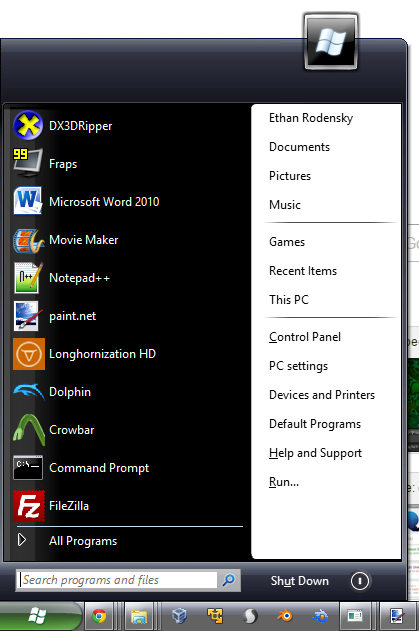
Look everyone, it's the Start Menu from post-pre-reset RTM Beta -1 Pre-alpha Omega-12 Vistahorn Milestone 42 Build 5074!  |
|
|
Forum: Start Menu Skins Topic: Vista Beta (Win7 style) & Blue Max (Classic, Win7 style) |
| Splitwirez |
|
Posted: Sun Sep 06, 2015 3:31 am
|
|
Replies: 30
Views: 15971
|
| Splitwirez. I believe the time it took you. You gave it some definition. You are el taco supremo. Why do you need me to add it? Anything I upload is for anyone to modify and upload it again. I don't care. It was never mine in the first place. Just playing around. Good job.:) * Satisfaction Intensif... |
|
|
Forum: Start Menu Skins Topic: Vista Beta (Win7 style) & Blue Max (Classic, Win7 style) |
| Splitwirez |
|
Posted: Sat Sep 05, 2015 9:03 pm
|
|
Replies: 30
Views: 15971
|
| About that original user picture frame, on the 5112. The one you supplied is almost the same as mine, just a little off size. I had it at the very start, when the top of menu was original height, then I chopped it out. There's a reason why it's not there. When the default beta flower picture is sho... |
|
|
Forum: Feature Requests Topic: Hide search box in windows start menu |
| Splitwirez |
|
Posted: Sat Sep 05, 2015 8:58 pm
|
|
Replies: 14
Views: 3746
|
f23948 wrote: thanks so much
No problem  |
|
|
Forum: Feature Requests Topic: Hide search box in windows start menu |
| Splitwirez |
|
Posted: Sat Sep 05, 2015 7:09 am
|
|
Replies: 14
Views: 3746
|
GauravK wrote: Here is another black one (Set to size 100 to fit the large taskbar):
Longhorn Fusion?? |
|
|
Forum: Feature Requests Topic: Hide search box in windows start menu |
| Splitwirez |
|
Posted: Sat Sep 05, 2015 3:46 am
|
|
Replies: 14
Views: 3746
|
| You mean like this button? http://www.classicshell.net/forum/viewtopic.php?f=18&t=3087 Or you want the Windows 7 Pearl orb and Start text next to it? nope. i want windows 7 pearl orb. sorry i'm not good at drawing, i use MS paint http://i.imgur.com/yRQC9X6.png Funny thing is, I already made a b... |
|
|
Forum: Start Menu Skins Topic: Vista Beta (Win7 style) & Blue Max (Classic, Win7 style) |
| Splitwirez |
|
Posted: Fri Sep 04, 2015 5:09 pm
|
|
Replies: 30
Views: 15971
|
| Ehehe...sorry to bother you again, but there's one thing that's really bugging me about this skin: it doesn't actually include the user avatar frame from Vista Beta 1 :lol: I'd really appreciate if you could rectify this. To make the job easier, I've already gone and ripped it, and prepared it to be... |
|
|
Forum: Start Menu Skins Topic: Request: StartIsBack skin |
| Splitwirez |
|
Posted: Fri Sep 04, 2015 12:42 pm
|
|
Replies: 17
Views: 10202
|
| Ehehe... http://www.mediafire.com/convkey/64ab/jpyfmvi5s339jxmzg.jpg?size_id=5 Here you go: http://www.mediafire.com/download/d2ac2ic9wq27ihb/StartIsShellButton.zip I apologize for the user picture, I still can't seem to get the hang of making those user image masks >.< Also, to anyone wondering, th... |
|
|
Forum: Start Menu Skins Topic: [REQUEST] Mac Skin? |
| Splitwirez |
|
Posted: Fri Sep 04, 2015 11:48 am
|
|
Replies: 12
Views: 7643
|
| http://www.mediafire.com/convkey/64d4/qq23jyq2wkcj78dzg.jpg?size_id=5 Well, I tried. Is this anything akin to what you're looking for? I'm not an Apple user myself, so I apologize if it doesn't quite match the look or feel. If you have any suggestions, I'll see what I can do. There are a few minor ... |
|
|
Forum: Start Buttons Topic: Classic Square Start Button |
| Splitwirez |
|
Posted: Wed Sep 02, 2015 1:42 pm
|
|
Replies: 2
Views: 2720
|
| Looks like the leftmost of Windows Codename Chicago's Start Buttons |
|
|
Forum: Feature Requests Topic: Vista-style Log Off/Shut Down Button for skin7? |
| Splitwirez |
|
Posted: Fri Aug 28, 2015 10:32 am
|
|
Replies: 8
Views: 2518
|
| Yeah, Classic shell should have an open skinning api for much more customization in the start menu. This opens up the possibility not only for Vista skins, but community-made Gnome, KDE, and even Unity skins, all in Windows. Expand that to the taskbar and flyout options on the right and we could ha... |
|
|
Forum: Feature Requests Topic: Vista-style Log Off/Shut Down Button for skin7? |
| Splitwirez |
|
Posted: Fri Aug 28, 2015 9:35 am
|
|
Replies: 8
Views: 2518
|
phly95 wrote: +1 for this feature. I didn't even think about it until I saw it just now. That looks pretty useful, although now that I think of it, Win+L also does that, but it's good for people who want to get to it through start.
I also want it because it opens up possibilities for skinning... :3 |
|
|
Forum: Feature Requests Topic: Vista-style Log Off/Shut Down Button for skin7? |
| Splitwirez |
|
Posted: Thu Aug 27, 2015 9:33 am
|
|
Replies: 8
Views: 2518
|
| You can't have 2 power buttons plus a submenu like Vista in Classic Shell's Start Menu. The closest you can have is a glossy red Shutdown button and a colorful submenu button: http://www.classicshell.net/forum/viewtopic.php?f=17&t=5063 No, this is not possible now and is not practical to add. N... |
|
|
Forum: Feature Requests Topic: Vista-style Log Off/Shut Down Button for skin7? |
| Splitwirez |
|
Posted: Thu Aug 27, 2015 3:01 am
|
|
Replies: 8
Views: 2518
|
| ...is this thread invisible or something? ._. |
|
|
Forum: Feature Requests Topic: disabling network flyout on Windows 8-10 |
| Splitwirez |
|
Posted: Tue Aug 25, 2015 5:33 pm
|
|
Replies: 7
Views: 2926
|
| I'd kill for this, or (better yet) the Vista-style Wi-Fi connection dialogue. |
|
|
Forum: Start Buttons Topic: (request) Start button of Atlanta Falcons Logo please. |
| Splitwirez |
|
Posted: Tue Aug 25, 2015 3:07 pm
|
|
Replies: 1
Views: 1676
|
| Done. Size 50 looks good on a large taskbar. Let me know if you're satisfied, I'd be happy to tweak it if you're not :3 |
|
|
Forum: Start Menu Skins Topic: Vista Beta (Win7 style) & Blue Max (Classic, Win7 style) |
| Splitwirez |
|
Posted: Tue Aug 18, 2015 9:46 am
|
|
Replies: 30
Views: 15971
|
| ...And I don't understand this post at all. :? In English, what do I need to do to make transparency work? That was english ._. Simplified instructions: 1. Add a new blank layer 2. Move the new layer below your image layer 3. Merge your image layer onto the new layer 4. Save as non-layered format, ... |
|
|
Forum: Start Menu Skins Topic: Vista Beta (Win7 style) & Blue Max (Classic, Win7 style) |
| Splitwirez |
|
Posted: Tue Aug 18, 2015 7:17 am
|
|
Replies: 30
Views: 15971
|
| I guess it's just I can't figure out how to make transparency work in Paint.NET. I'll slide the transparency sliders all the way to most transparent, and then when I paint with the transparent color, it always comes out in things like Word as a solid color. I tried your skin, but it doesn't seem to... |
|
|
Forum: Start Buttons Topic: Windows 8.1/Windows 10 Button which follows Taskbar Color |
| Splitwirez |
|
Posted: Sat Aug 15, 2015 12:50 pm
|
|
Replies: 24
Views: 229351
|
jacatone wrote: How do you download these attachments?
Right-click > Save as/Save Target as/Save image as/etc |
|
|
Forum: Feature Requests Topic: Vista-style Log Off/Shut Down Button for skin7? |
| Splitwirez |
|
Posted: Sat Aug 15, 2015 9:50 am
|
|
Replies: 8
Views: 2518
|
| I was wondering, might it be possible to add an option for a Vista-style log off/shut down button? I found this to be a nice touch on my old Vista craptop (which now has Longhorn 4039 on it ._. ), and would like to see that feature make a return in Classic Shell. If you don't know what I mean, look ... |
|
|
Forum: Start Buttons Topic: Windows Robotic Silver |
| Splitwirez |
|
Posted: Fri Aug 14, 2015 8:22 am
|
|
Replies: 2
Views: 3527
|
|
|
Forum: Feature Requests Topic: Ability to Put Tags on Files/Folders in Classic Explorer |
| Splitwirez |
|
Posted: Thu Aug 13, 2015 5:08 pm
|
|
Replies: 12
Views: 6422
|
| Wouldn't this basically be the manual equivalent of WinFS? |
|
|
Forum: Classic Start Menu Topic: Does Classic Shell modify the Windows shell... |
| Splitwirez |
|
Posted: Wed Aug 12, 2015 1:13 pm
|
|
Replies: 2
Views: 697
|
Ivo wrote: No, Classic Shell does not modify any system files. It only registers itself in the registry.
:DDDDDDDDD |
|
|
Forum: Classic Start Menu Topic: Does Classic Shell modify the Windows shell... |
| Splitwirez |
|
Posted: Wed Aug 12, 2015 12:55 pm
|
|
Replies: 2
Views: 697
|
| Full question: Does the Classic Shell Start Menu modify any system files? I really want to start using it on my host OS again, but I'm no longer allowed to use anything that modifies the aforementioned... |
|
|
Forum: Chitchat Topic: Aero and theme conversion |
| Splitwirez |
|
Posted: Wed Aug 12, 2015 9:21 am
|
|
Replies: 13
Views: 4275
|
| I think I'll just wait until BigMuscle finishes his tool. It seems like it'll be a lot more polished. I just thought there was a way to use native Windows 10 glass (like used on start menu and taskbar if enabled under Classic Shell) on windows titlebars. Wait, what? I thought you said anything that... |
|
|
Forum: Chitchat Topic: Aero and theme conversion |
| Splitwirez |
|
Posted: Tue Aug 11, 2015 10:10 pm
|
|
Replies: 13
Views: 4275
|
phly95 wrote: I tried it and it looked horrible. Firefox was all screwed up and file explorer had no effect. Thanks for the suggestion though, I appreciate it.
That's why it has an exception list. Add Firefox to it, and remove explorer from it. Also, x64 and x86, remember? |
|
|
Forum: Chitchat Topic: Aero and theme conversion |
| Splitwirez |
|
Posted: Tue Aug 11, 2015 9:20 pm
|
|
Replies: 13
Views: 4275
|
| So what about Aero glass for titlebars? It seems you have a stable solution for the taskbar, is there anything preventing you from doing native glass with titlebars? TrueTransparency...? Have you tested it with Windows 10? I don't have a VM to use it on. This is my only computer so anything that co... |
|
|
Forum: Chitchat Topic: Aero and theme conversion |
| Splitwirez |
|
Posted: Tue Aug 11, 2015 7:28 pm
|
|
Replies: 13
Views: 4275
|
phly95 wrote: So what about Aero glass for titlebars? It seems you have a stable solution for the taskbar, is there anything preventing you from doing native glass with titlebars?
TrueTransparency...? |
|
|
Forum: Start Menu Skins Topic: Windows Glass Luna - XP Luna with Glass Colour Support!! |
| Splitwirez |
|
Posted: Mon Aug 10, 2015 8:46 am
|
|
Replies: 2
Views: 4898
|
ben158 wrote: Looks great. Using it right now (with a different start button).
C:
I might make a version 2, with better colour compliance, and perhaps a bit of glass colour on the right column. Does that appeal? |
|
|
Forum: Start Menu Skins Topic: Glass Luna XP |
| Splitwirez |
|
Posted: Sun Aug 09, 2015 3:49 pm
|
|
Replies: 10
Views: 5190
|
| Um...I made a modded Luna skin that takes the Glass colour over the regions which were blue in the original skin. It's not a match for the exact goal, but I would think it's kinda close...does such a thing have any appeal? EDIT: Here it is: http://www.classicshell.net/forum/viewtopic.php?f=17&t=... |
|
|
Forum: Feature Requests Topic: Aero Flip 3D |
| Splitwirez |
|
Posted: Sun Aug 09, 2015 3:45 pm
|
|
Replies: 4
Views: 2896
|
| I would recommend trying out task view though, it's a very useful feature and IMO it's pretty cool as well. I do like that there is the choice to use third party apps to restore old functionality though. It's a shame Microsoft started making such apps necessary, am I right? (*cough*RIP Win2k Start ... |
|
|
Forum: Chitchat Topic: Aero and theme conversion |
| Splitwirez |
|
Posted: Sun Aug 09, 2015 3:38 pm
|
|
Replies: 13
Views: 4275
|
| I'd like to note that Vista Style Builder can convert XP, Vista, and 7 styles to and from one another. Windows 8/8.1 support is still in beta, and Windows 10 support is still tuned for the earlier builds. It's about as accurate as Google translate, but it's a start. Heck, I had a few converted XP th... |
|
|
Forum: Feature Requests Topic: Feature Request: For the Website |
| Splitwirez |
|
Posted: Fri Aug 07, 2015 6:48 am
|
|
Replies: 3
Views: 982
|
| Post dates are recorded and displayed in the top-right corner of the post. Not as convenient, but it's there nonetheless :Y |
|
|
Forum: Start Buttons Topic: Start button creation related questions |
| Splitwirez |
|
Posted: Thu Aug 06, 2015 1:24 pm
|
|
Replies: 5
Views: 2238
|
| How much padding, in terms of pixels would you say the average icon should have on top, bottom, sides and in between the states? I don't want to keep working on this project only to find out it's totally fugly because of the padding, you know? That depends on the button. Also, note that there's a s... |
|
|
Forum: Start Buttons Topic: Start button creation related questions |
| Splitwirez |
|
Posted: Thu Aug 06, 2015 12:45 pm
|
|
Replies: 5
Views: 2238
|
| The padding determines how much space there will be on the left and the right of the image when it is placed on the taskbar. The left/right padding matters for horizontal taskbars and top/bottom padding is for the vertical taskbars. Also since the image is centered on the taskbar, asymmetrical padd... |
|
|
Forum: Start Menu Skins Topic: Vista Beta (Win7 style) & Blue Max (Classic, Win7 style) |
| Splitwirez |
|
Posted: Thu Aug 06, 2015 12:43 pm
|
|
Replies: 30
Views: 15971
|
| I guess it's just I can't figure out how to make transparency work in Paint.NET. I'll slide the transparency sliders all the way to most transparent, and then when I paint with the transparent color, it always comes out in things like Word as a solid color. I tried your skin, but it doesn't seem to... |
|
|
Forum: Feature Requests Topic: Slight UI improvements on Windows 10 |
| Splitwirez |
|
Posted: Thu Aug 06, 2015 12:05 pm
|
|
Replies: 10
Views: 4103
|
| Ah yes window borders, they are different thank goodness! I just don't understand Microsoft. They add features like Snap to use windows side-by-side and then they make it hard for the user to figure out the active window? I mean c'mon this is getting rid of basic usability that even Windows 3.0 had... |
|
|
Forum: Feature Requests Topic: Slight UI improvements on Windows 10 |
| Splitwirez |
|
Posted: Thu Aug 06, 2015 7:27 am
|
|
Replies: 10
Views: 4103
|
| Um...doesn't Win10 Aerolite use the same colour for active and inactive Window borders? D: Yes the title bar color is the same but the red Close button is different and title bar text too: I said Window Border colour, not Title Bar/Caption colour... ...me, problem is solved, and that's good enough ... |
|
|
Forum: Feature Requests Topic: Slight UI improvements on Windows 10 |
| Splitwirez |
|
Posted: Thu Aug 06, 2015 3:57 am
|
|
Replies: 10
Views: 4103
|
| There is another option of using the Aero Lite theme: http://winaero.com/blog/different-active-and-inactive-windows-in-windows-10/ That makes title bars usable however it makes the taskbar text black which is hard to see on a dark taskbar. Um...doesn't Win10 Aerolite use the same colour for active ... |
|
|
Forum: Feature Requests Topic: Slight UI improvements on Windows 10 |
| Splitwirez |
|
Posted: Wed Aug 05, 2015 6:05 pm
|
|
Replies: 10
Views: 4103
|
| Right that's about as good as it gets. It's better than all white though. In comparison to Windows 8 where it was so easy to distinguish active windows from inactive ones. Or even on Windows 7 with the bright red close button. Hopefully someone will release an unofficial theme for Windows 10 in the... |
|
|
Forum: Start Menu Skins Topic: Vista Beta (Win7 style) & Blue Max (Classic, Win7 style) |
| Splitwirez |
|
Posted: Wed Aug 05, 2015 12:26 pm
|
|
Replies: 30
Views: 15971
|
| I was able to replace all the right things in the Windows 7 version of the skin, but I lost the taskbar transparency. Paint told me I'd lose it. Is that the only problem? Do I need to use an editor other than paint? What do you suggest (please not Paint.NET. That thing's awful at transparency in pa... |
|
|
Forum: Start Menu Skins Topic: Can't Locate "Claude Glass Skin" |
| Splitwirez |
|
Posted: Wed Aug 05, 2015 7:31 am
|
|
Replies: 13
Views: 8663
|
| Hi Splitwirez. I'm kind of jumping the gun. I finished adding the splitbuttons to the skin, before you. And here it is. If you are in the process of completing yours, I will delete this one. Apparently some people want a menu to match the taskbar in Win 10. This one is close with default blur/auto ... |
|
|
| Sort by: |

 Login
Login Register
 FAQ
FAQ Search
 Members