| Author |
Message |
Forum: Chitchat Topic: Forum cleanup and new moderators? |
| Splitwirez |
|
Posted: Wed Oct 26, 2016 5:39 pm
|
|
Replies: 19
Views: 7959
|
Jcee wrote: if it doesn't contain pornography.. or directly threaten another human, its permitted...
Wait, why is non-pornographic shock material permitted? .-.
(Apologies for butting in btw) |
|
 |
Forum: Start Buttons Topic: Windows XP Beta Flag Animation Start Button |
| Splitwirez |
|
Posted: Wed Oct 26, 2016 1:50 pm
|
|
Replies: 11
Views: 9059
|
Weboh wrote: Niiiice! How hard would it be to attach the rest of the Luna start button to it?
It'd be kind of a pain. Not hard though, just tedious  |
|
|
Forum: Chitchat Topic: ANYONE ELSE HERE WISH THIS WAS REAL? |
| Splitwirez |
|
Posted: Mon Oct 24, 2016 10:24 am
|
|
Replies: 4
Views: 1820
|
| You can kind of get that effect (customizable, flashy if you want, animations) with WindowFX but we can't talk about that here because it's made by the company that makes Classic Shells competitor, Start8/10. So shhh! It's a secret to everybody! 8-) Wait...you can get those exact animations with Wi... |
|
|
Forum: Feature Requests Topic: Windows 10 Technical Preview (9841 - 9879) Menu Style |
| Splitwirez |
|
Posted: Tue Oct 18, 2016 7:09 pm
|
|
Replies: 28
Views: 10506
|
| your right.. if your goal is to 'perfectly' match a specific menu for whatever reason...your not going to see it without a specific style. It is, and I have no idea why .-. The issue here is.. If IVO were to choose any windows 10 style to match.. it would probably be the most popular one.. (which I... |
|
|
Forum: Feature Requests Topic: Windows 10 Technical Preview (9841 - 9879) Menu Style |
| Splitwirez |
|
Posted: Tue Oct 18, 2016 4:10 pm
|
|
Replies: 28
Views: 10506
|
| Yes adding complex features would be harder to incorporate than to fork into their own 'style' but because of customizability it would be better. and in the long run (with more features added) it would take longer. Alright, so there's that. look at new features since the 4.0 series.. most of them a... |
|
|
Forum: Feature Requests Topic: Windows 10 Technical Preview (9841 - 9879) Menu Style |
| Splitwirez |
|
Posted: Tue Oct 18, 2016 8:39 am
|
|
Replies: 28
Views: 10506
|
| adding features allow you to further customize a menu to your needs. Well yeah, but that could get really hard to pull off...right? Not to mention that you kinda lose the core of the menu style... adding a new style (aside from being considerable work) locks you down with a specific feature-set and... |
|
|
Forum: Feature Requests Topic: Windows 10 Technical Preview (9841 - 9879) Menu Style |
| Splitwirez |
|
Posted: Tue Oct 18, 2016 4:47 am
|
|
Replies: 28
Views: 10506
|
| the user picture can have a link to any app correct? you can place the user picture anywhere, or any size you want correct? so you could make the user picture 1 pixel, and the picture frame to look like a shutdown button.. with a link to the shutdown dialog... n the classic/2 column style recent it... |
|
|
Forum: Feature Requests Topic: Windows 10 Technical Preview (9841 - 9879) Menu Style |
| Splitwirez |
|
Posted: Mon Oct 17, 2016 5:53 pm
|
|
Replies: 28
Views: 10506
|
| I was talking about tiles in general. D: Yes there is more to that specific menu, but having tiles is the primary obstacle in obtaining any windows 8-10 style... Fair enough ._. Aside from tiles, and the location of the power button, what else is there that classic shell can't already do? Having th... |
|
|
Forum: Feature Requests Topic: Windows 10 Technical Preview (9841 - 9879) Menu Style |
| Splitwirez |
|
Posted: Mon Oct 17, 2016 4:43 pm
|
|
Replies: 28
Views: 10506
|
Uh
question
are we still talking about a menu style in the form of the menu in Windows Technical Preview builds 9841 - 9879, or are we now just talking about tiles in general...? 'cause for me, it's more than just the tiles that make the menu... .-. |
|
|
Forum: Chitchat Topic: What's happening to Win 10 start menu? |
| Splitwirez |
|
Posted: Mon Oct 17, 2016 3:52 pm
|
|
Replies: 5
Views: 2049
|
| ...are you sure that isn't just a bug? |
|
|
Forum: Feature Requests Topic: Windows 10 Technical Preview (9841 - 9879) Menu Style |
| Splitwirez |
|
Posted: Mon Oct 17, 2016 12:14 pm
|
|
Replies: 28
Views: 10506
|
| If your list-style menu spans multiple columns, you can use Ctrl+left and Ctrl+right arrows keys to move to the same row on the next column. Also, the list-style menu supports keyboard accelerators so you can select an item by pressing its beginning letter. You can also use Home/End. ...am I missin... |
|
|
Forum: Feature Requests Topic: Windows 10 Technical Preview (9841 - 9879) Menu Style |
| Splitwirez |
|
Posted: Mon Oct 17, 2016 8:26 am
|
|
Replies: 28
Views: 10506
|
| It can't be a 3rd-party recreation of the features - the apps provide their live data in a way that only Windows understands, and Windows must in turn send that information to the live tile. I suspect the data will be extremely hard to get, if at all possible. Tbh I'd assumed you'd probably just om... |
|
|
Forum: Feature Requests Topic: Windows 10 Technical Preview (9841 - 9879) Menu Style |
| Splitwirez |
|
Posted: Mon Oct 17, 2016 7:24 am
|
|
Replies: 28
Views: 10506
|
| Figured this was the one u meant :P and yea quite a few users have requested it. IVO's official response is that there is no API to work with live tiles. IE if he were to do it, the tiles wouldn't be animated, and it would still be ALOT of work, to enable features like drag/drop. I know there's no ... |
|
|
Forum: Feature Requests Topic: Text Shadows |
| Splitwirez |
|
Posted: Mon Oct 17, 2016 7:19 am
|
|
Replies: 7
Views: 2010
|
| Yea.. but aero glass 8.1 isn't free... and hooks quite deep into your system... Aeroglass 8.1 is available for free, you just have to pay to remove the watermark and once-or-twice-daily upgrade nags. Really not that big of a deal, especially if you just do what I did: http://i.imgur.com/VAu8lJP.png... |
|
|
Forum: Feature Requests Topic: Windows 10 Technical Preview (9841 - 9879) Menu Style |
| Splitwirez |
|
Posted: Mon Oct 17, 2016 4:16 am
|
|
Replies: 28
Views: 10506
|
bump
...or am I the only one who wants this? .-. |
|
|
Forum: Feature Requests Topic: Text Shadows |
| Splitwirez |
|
Posted: Mon Oct 17, 2016 4:15 am
|
|
Replies: 7
Views: 2010
|
| Looks like about 40% of windows machines are on windows 8+, and about 50% on 7, with 10% everything else :P so 7 still has 10 beat by a significant margin.. but that is still ALOT of users who would benefit from such a feature... True, but as stated above, the right conditions can restore text glow... |
|
|
Forum: Feature Requests Topic: Text Shadows |
| Splitwirez |
|
Posted: Sun Oct 16, 2016 6:46 pm
|
|
Replies: 7
Views: 2010
|
| I remembered that shortly after the post, but my request is still valid for 8-10 :P even if it's not a particularly easy one to fulfill. I believe the need is greater than ever (with so many people on windows 8+) When I first posted this request; windows 8 was new and didn't have the same # of inst... |
|
|
Forum: Start Menu Skins Topic: Request: Sonic skin |
| Splitwirez |
|
Posted: Sun Oct 16, 2016 6:45 pm
|
|
Replies: 15
Views: 8822
|
Jcee wrote: Those were remnants from when I was testing the minimum/maximum widths of the start menu to make sure the pattern repeated properly 
Oh
lel |
|
|
Forum: Start Menu Skins Topic: Request: Sonic skin |
| Splitwirez |
|
Posted: Sun Oct 16, 2016 5:44 pm
|
|
Replies: 15
Views: 8822
|
Jcee wrote: RRRRRRRRRRRRRRR Jcee wrote: DDDDD
Did you have a stroke while typing that stuff or something? |
|
|
Forum: Chitchat Topic: ANYONE ELSE HERE WISH THIS WAS REAL? |
| Splitwirez |
|
Posted: Sun Oct 16, 2016 10:14 am
|
|
Replies: 4
Views: 1820
|
|
|
Forum: Feature Requests Topic: Text Shadows |
| Splitwirez |
|
Posted: Sun Oct 16, 2016 6:24 am
|
|
Replies: 7
Views: 2010
|
| Text glow exists. You can just make the glow colour black. Only problem is, you need a 3rd-party Visual Style (and possibly Aeroglass 8.1+, idk) for it to work on Windows 8 and newer ._. |
|
|
Forum: Feature Requests Topic: Windows 10 Technical Preview (9841 - 9879) Menu Style |
| Splitwirez |
|
Posted: Wed Oct 12, 2016 11:50 am
|
|
Replies: 28
Views: 10506
|
Numerous users wrote:
Please? :3 |
|
|
Forum: Chitchat Topic: Show your desktop and Classic Shell Start Menu |
| Splitwirez |
|
Posted: Fri Oct 07, 2016 6:48 am
|
|
Replies: 135
Views: 97748
|

Fweeeeee :V |
|
|
Forum: Taskbar Skins Topic: New taskbar options |
| Splitwirez |
|
Posted: Fri Oct 07, 2016 4:31 am
|
|
Replies: 105
Views: 82285
|
| I know this is probably reviving an older thread, but does anybody here know how to get rid of that annoying overlay that blocks and conflicts with some taskbars? http://i.imgur.com/AnobTvE.png On Windows 7 and 8.1, you'll need a custom Visual Style On Windows 10, you'll need StartIsBack++ and a cu... |
|
|
Forum: Chitchat Topic: Lol what |
| Splitwirez |
|
Posted: Wed Oct 05, 2016 4:02 am
|
|
Replies: 3
Views: 1555
|
| That is hilarious.. it should (and used to) reduce size of the whole buttons (and taskbar with it) not just the icons. Lets hope they fix it. (though knowing micro-soft they would probably 'fix' it by removing the option Actually they did fix it for once. Properly. Plus this bug only lasted for abo... |
|
|
Forum: Chitchat Topic: Lol what |
| Splitwirez |
|
Posted: Sat Oct 01, 2016 7:47 am
|
|
Replies: 3
Views: 1555
|
So I was messing with Windows 10 Technical Preview build 9841 in a VM
And then this:
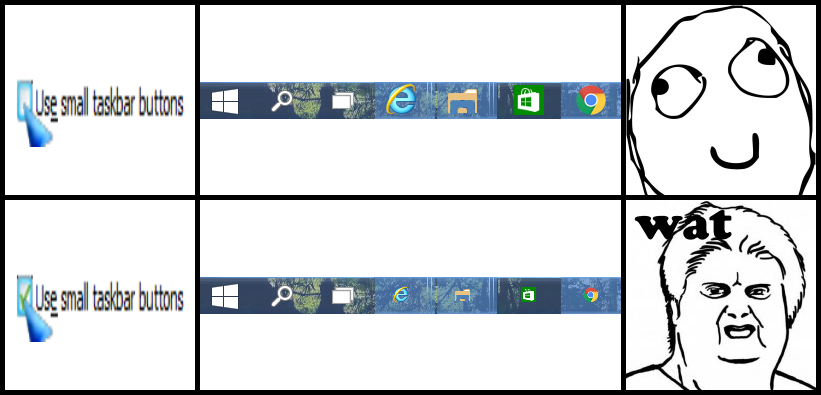
Guess I just thought someone here might find this funny ._. |
|
|
Forum: Classic Start Menu Topic: How to get default Windows 10 Start Menu back? |
| Splitwirez |
|
Posted: Thu Sep 29, 2016 5:06 pm
|
|
Replies: 5
Views: 5170
|
Marquizel wrote: I had this same question and eventually figured it out.
Just go to the Controls tab -> left click -> Windows Start Menu
That ignores whatever you have selected for the Classic Shell mods
Might want to do the same for "Windows key" |
|
|
Forum: Feature Requests Topic: A True Classic Explorer, Images, Menu Bar |
| Splitwirez |
|
Posted: Wed Sep 28, 2016 1:30 pm
|
|
Replies: 28
Views: 14851
|
| It's XP. That's the whole point - TrueTransparency and BorderSkin provide the glass borders, while Styler provides the explorer interface, and together they have you fooled :lol: Oh. That's pretty cool. I found a video on youtube where someone installed styler toolbar on windows 7. Maybe it could w... |
|
|
Forum: Feature Requests Topic: A True Classic Explorer, Images, Menu Bar |
| Splitwirez |
|
Posted: Tue Sep 27, 2016 8:10 pm
|
|
Replies: 28
Views: 14851
|
| Ok, thanks for letting me know. It's too bad that it doesn't work on any OS other than windows xp. :s The screenshot I found looks like vista though? Or it could of been a visual theme plus the toolbar on windows xp that made it look that way. It's XP. That's the whole point - TrueTransparency and ... |
|
|
Forum: Feature Requests Topic: A True Classic Explorer, Images, Menu Bar |
| Splitwirez |
|
Posted: Tue Sep 27, 2016 11:40 am
|
|
Replies: 28
Views: 14851
|
Styler Toolbar adds a highly customizeable toolbar which can be skinned for different appearances and layouts. It can replace the main XP toolbars' functionality in a much more elegant-looking manner.
So basically it's exactly what this thread is asking for, but for Windows XP only ._. |
|
|
Forum: Feature Requests Topic: A True Classic Explorer, Images, Menu Bar |
| Splitwirez |
|
Posted: Mon Sep 26, 2016 7:35 pm
|
|
Replies: 28
Views: 14851
|
I feel the need to mention Styler Toolbar...
...again... |
|
|
Forum: Start Buttons Topic: Dark spOre & Light spOre start buttons |
| Splitwirez |
|
Posted: Sun Sep 25, 2016 9:29 am
|
|
Replies: 3
Views: 5069
|
SuperGiulia wrote: i love them , the first 3 , can i resize ? how can i resize ? can i use a program like irfanview?
thanks
Actually, Classic Shell has its own setting to change the size of the button |
|
|
Forum: Feature Requests Topic: Windows 8 taskbar blur |
| Splitwirez |
|
Posted: Tue Sep 20, 2016 8:33 am
|
|
Replies: 3
Views: 2079
|
АдмиралАнимЕ wrote: Ohh I see now. Thanks! It's a bit confusing. It was not working because I changed the colour, apparently it has to be on the default value.
Heh, yeah, it is kinda finnicky |
|
|
Forum: Feature Requests Topic: Windows 8 taskbar blur |
| Splitwirez |
|
Posted: Tue Sep 20, 2016 5:04 am
|
|
Replies: 3
Views: 2079
|
| Classic Shell already has that feature on Windows 8, it's just labelled "Opaque", likely because it does in fact make the Taskbar opaque if Aeroglass 8.1+ is not installed. But if you do have Aeroglass 8.1+, you'll get a nice glassy blur effect instead. |
|
|
Forum: Start Menu Skins Topic: ASUS K20 Evolution (Win 7 style) |
| Splitwirez |
|
Posted: Mon Sep 19, 2016 9:49 am
|
|
Replies: 25
Views: 13789
|
Meh, may as well post this here:
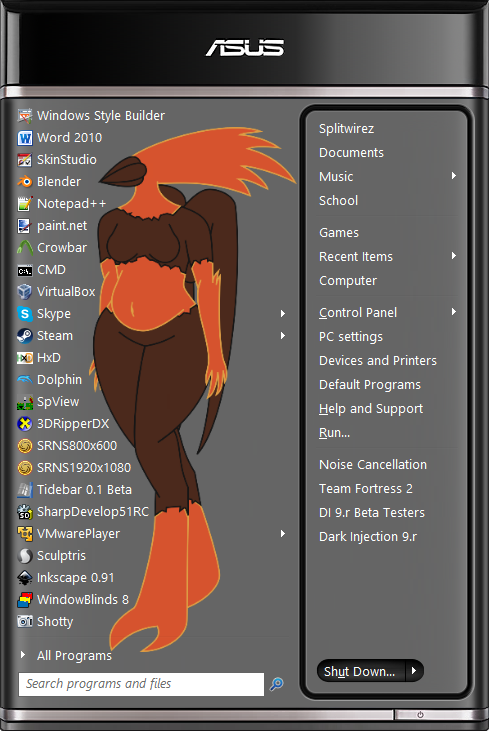
|
|
|
Forum: Start Menu Skins Topic: Is there any way to impliment more than just 3 tint colors? |
| Splitwirez |
|
Posted: Sat Sep 17, 2016 5:02 pm
|
|
Replies: 29
Views: 8591
|
| I did kind of figure everything out for the skin. It works as it should with a minimal regular theme. Just don't know enough about making a theme that can work in Win 10, that does not screw up the look on web pages. Splitwirez might know if possible? :) Just use WSB to port this to Windows 10: htt... |
|
|
Forum: Start Buttons Topic: Aperture Science Spinning Start Button |
| Splitwirez |
|
Posted: Sat Sep 17, 2016 4:59 pm
|
|
Replies: 7
Views: 5724
|
|
|
Forum: Feature Requests Topic: Windows-style start menu positioning |
| Splitwirez |
|
Posted: Fri Sep 16, 2016 3:48 am
|
|
Replies: 13
Views: 4409
|
| If you think about what is said here: [highlight=#dce1e5]You seem to be using a custom theme that may be adding an extra edge to the taskbar. [/highlight] You might realize there is an alternative route to acomplish what you are looking for, IE use classic shell to make the taskbar clear, and then ... |
|
|
Forum: Feature Requests Topic: Windows-style start menu positioning |
| Splitwirez |
|
Posted: Mon Sep 12, 2016 11:09 am
|
|
Replies: 13
Views: 4409
|
| The menu is intentionally behind the taskbar, because otherwise the shadow will look weird. I know this is kinda trivial, but it'd be nice to have an option to change that to facilitate the other setting I mentioned. Think of the theming possibilities... Also the shadow was on top of the taskbar in... |
|
|
Forum: Feature Requests Topic: Windows-style start menu positioning |
| Splitwirez |
|
Posted: Mon Sep 12, 2016 8:15 am
|
|
Replies: 13
Views: 4409
|
| You seem to be using a custom theme that may be adding an extra edge to the taskbar. It may be tricking the start menu into positioning in the wrong spot. You may have to edit the skin and play with some padding to compensate. ...IIUC, this is actually the exact opposite - that's a screenshot of Wi... |
|
|
Forum: Taskbar Skins Topic: OS Styled Taskbar Skin Compilation |
| Splitwirez |
|
Posted: Wed Sep 07, 2016 1:02 pm
|
|
Replies: 16
Views: 13347
|
| Pretty much everything so far: I've always been a fan of the taskbar from Windows Vista's Aero theme (truthfully, it was one of the first things that came to my mind when I found out about Classic Shell adding taskbar skinning). So I decided to rip and share it with everyone. Windows Vista Basic (Ho... |
|
|
Forum: Start Menu Skins Topic: Is there any way to impliment more than just 3 tint colors? |
| Splitwirez |
|
Posted: Sun Sep 04, 2016 9:51 am
|
|
Replies: 29
Views: 8591
|
| Hi Splitwirez. I gather you are talking about R.O.B.'s link: http://forum.thinkpads.com/viewtopic.php?f=67&t=113024 and yours: http://winclassic.boards.net/ Yes Did not try it. D: I don't have all the time in the world to read all the forums. Who does have time for all the forums? .-. It's fine... |
|
|
Forum: Start Menu Skins Topic: Is there any way to impliment more than just 3 tint colors? |
| Splitwirez |
|
Posted: Sat Sep 03, 2016 2:01 pm
|
|
Replies: 29
Views: 8591
|
| hey Splitwirez. Huh. Does that mean a future build has it old build had it, or are you pulling my leg, with a hack? Umm...yes and no. The Classic Theme was never removed, and all it takes is one tiny 3rd-party tool to re-enable it. Said tool doesn't even need to kill DWM to do so! Problem is, half ... |
|
|
Forum: Start Menu Skins Topic: Is there any way to impliment more than just 3 tint colors? |
| Splitwirez |
|
Posted: Sat Sep 03, 2016 11:47 am
|
|
Replies: 29
Views: 8591
|
| I found a classic theme that can be used on Win 10, along with built in 3d border variation of your skin (using the $ system text). http://kizo2703.deviantart.com/art/Windows-classic-theme-for-Windows-8-RTM-8-1-10-325642288 looks promising :) ...how does that look promising? It's just a High Contra... |
|
|
Forum: Start Menu Skins Topic: Windows 10 Start Menu With Emblem Tiles |
| Splitwirez |
|
Posted: Thu Sep 01, 2016 3:35 am
|
|
Replies: 35
Views: 13829
|
| Thou shalt not gesticulate wildly. Thou shalt not drink more than one beer. Thou shalt not take over another's post. Thou shalt not fart in public Thou shalt not drive if easily distracted by busty joggers Thou shalt not shout 'SMITE MEE OH MIGHTY SMITEEERRR' Thou shalt not allow creepy old men who... |
|
|
Forum: Start Menu Skins Topic: Windows 10 Start Menu With Emblem Tiles |
| Splitwirez |
|
Posted: Wed Aug 31, 2016 6:36 pm
|
|
Replies: 35
Views: 13829
|
| I was day dreaming. Instead of metro tiles, have the whole area set up to use custom emblem image. For easy change up. Have a large family portrait, or weeks to do list giant sticky, or commandments- Thou shalt not gesticulate wildly. Thou shalt not drink more than one beer. Thou shalt not take ove... |
|
|
Forum: Taskbar Skins Topic: New taskbar options |
| Splitwirez |
|
Posted: Wed Aug 31, 2016 5:19 am
|
|
Replies: 105
Views: 82285
|
| I just got an idea.. Since it's basically the title bar style I wanted out of this.. Why not create an AeroGlass theme atlas file with that once AeroGlass is officially released for RS1? Won't need any modding system files or shiz with that method :D ...no...that defeats the purpose...Customatic pr... |
|
|
Forum: Taskbar Skins Topic: New taskbar options |
| Splitwirez |
|
Posted: Tue Aug 30, 2016 4:31 pm
|
|
Replies: 105
Views: 82285
|
| I just got an idea.. Since it's basically the title bar style I wanted out of this.. Why not create an AeroGlass theme atlas file with that once AeroGlass is officially released for RS1? Won't need any modding system files or shiz with that method :D ...no...that defeats the purpose...Customatic pr... |
|
|
Forum: Taskbar Skins Topic: New taskbar options |
| Splitwirez |
|
Posted: Tue Aug 30, 2016 12:16 pm
|
|
Replies: 105
Views: 82285
|
| How in the heck did you change the title bar?! :shock: A custom Visual Style :lol: I want that VS :shock: Windows 10 RS1 plz :shock: Also, @SketchAnimations2 no offense intended, but I nearly choked on my drink from your reaction, lmao. I was over here looking for new things and then my eyes landed... |
|
|
Forum: Start Menu Skins Topic: Windows 10 Start Menu With Emblem Tiles |
| Splitwirez |
|
Posted: Fri Aug 26, 2016 9:22 pm
|
|
Replies: 35
Views: 13829
|
redblade8 wrote: Nice start menu splitwirez. You made that with classic shell?
Yes. Thanks |
|
|
| Sort by: |

 Login
Login Register
 FAQ
FAQ Search
 Members