| Author |
Message |
Forum: Classic Start Menu Topic: Classic Shell on Windows 10 |
| NoelC |
|
Posted: Thu Apr 23, 2015 11:56 pm
|
|
Replies: 217
Views: 1038017
|
After the upgrade...
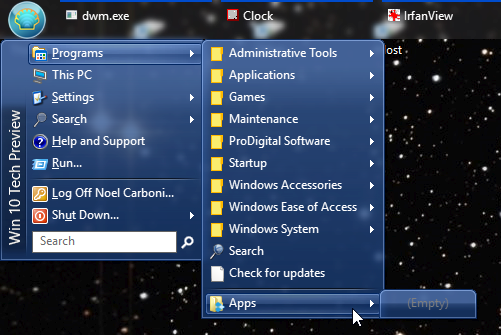
Removing and re-adding Apps to the menu structure didn't refresh the list.
10061 seems like a pretty buggy release.
-Noel |
|
 |
Forum: Classic Shell 4.0 beta Topic: Bug: Explorer Loses the Navigation Pane Spacing in Win 10 |
| NoelC |
|
Posted: Sat Apr 11, 2015 7:21 pm
|
|
Replies: 10
Views: 6850
|
Thank you!
Don't forget to change the download page so it says "Release" instead of "Beta".
Edit: Sorry, make that the "History" page, not "download".
-Noel |
|
|
Forum: Classic Shell 4.0 beta Topic: Minor ToolTip Bug |
| NoelC |
|
Posted: Fri Apr 10, 2015 4:33 am
|
|
Replies: 6
Views: 4207
|
| The instance I ran across was the Apps entry in the Customize Start Menu section (shown running on Win 10 build 10049). I was vague in my original post because a search of the sources would seem to be in order to turn up all cases of this class of issue. http://Noel.ProDigitalSoftware.com/ForumPosts... |
|
|
Forum: Classic Shell 4.0 beta Topic: Minor ToolTip Bug |
| NoelC |
|
Posted: Tue Apr 07, 2015 4:20 pm
|
|
Replies: 6
Views: 4207
|
I was thinking of Win 10, actually.
Maybe the wording could be "Windows 8 or later".
-Noel |
|
|
Forum: Classic Shell 4.0 beta Topic: Minor ToolTip Bug |
| NoelC |
|
Posted: Tue Apr 07, 2015 12:31 pm
|
|
Replies: 6
Views: 4207
|
I noticed that at least one ToolTip says something like "Windows 8 only". Just a heads up that you might want to search the whole project and find any references specifically to Windows 8.
-Noel |
|
|
Forum: Classic Shell 4.0 beta Topic: Bug: Explorer Loses the Navigation Pane Spacing in Win 10 |
| NoelC |
|
Posted: Sat Mar 28, 2015 9:21 pm
|
|
Replies: 10
Views: 6850
|
| Well, it's hardly unexpected. Unused code (in the typical sense) is being removed all the time, so re-enabling dormant functionality will become less and less viable over time. Not that I agree that they should be doing so. But they are. Explorer needed a rewrite a looong time ago. Most people nowad... |
|
|
Forum: Classic Shell 4.0 beta Topic: Bug: Explorer Loses the Navigation Pane Spacing in Win 10 |
| NoelC |
|
Posted: Sat Mar 28, 2015 1:08 pm
|
|
Replies: 10
Views: 6850
|
Thank you, Ivo. Looking forward to trying out the next beta.
-Noel |
|
|
Forum: Classic Start Menu Topic: Classic Shell on Windows 10 |
| NoelC |
|
Posted: Sat Mar 21, 2015 1:54 pm
|
|
Replies: 217
Views: 1038017
|
| I haven't been able to see any problems with it. It even still works as well as with prior versions with an Aero Glass prototype (thanks again for the "Disable Taskbar Transparency" setting). People are really going to want this once they figure out the search in Windows 10 start menu is a... |
|
|
Forum: Classic Shell 4.0 beta Topic: Bug: Explorer Loses the Navigation Pane Spacing in Win 10 |
| NoelC |
|
Posted: Thu Feb 19, 2015 9:52 am
|
|
Replies: 10
Views: 6850
|
I figured out how to reproduce it reliably.
One need only go into the Folder Options dialog and do most anything - e.g., press the [Clear] history button.

-Noel |
|
|
Forum: Chitchat Topic: My New PC is Win 7, Should I Upgrade to Win 10 ? |
| NoelC |
|
Posted: Tue Feb 10, 2015 10:17 pm
|
|
Replies: 2
Views: 688
|
| My suggestion: Modify your system with Classic Shell on Win 7. Then when Win 10 releases, read what people say and decide then. In the mean time, if your computer can support it, look into virtualization software - for example, VMware Workstation. That way you can run Win 10 in a limited environment... |
|
|
Forum: Classic Shell 4.0 beta Topic: Bug: Explorer Loses the Navigation Pane Spacing in Win 10 |
| NoelC |
|
Posted: Sun Feb 01, 2015 5:55 pm
|
|
Replies: 10
Views: 6850
|
| Launching a new window does indeed fix it. I've yet to pinpoint what causes it. It always seems to happen when I'm not looking at the Explorer window. A few moments ago I completed an installation of an application and now I noticed the rows in my two open Explorer windows are widely spaced again. I... |
|
|
Forum: Classic Shell 4.0 beta Topic: Bug: Explorer Loses the Navigation Pane Spacing in Win 10 |
| NoelC |
|
Posted: Fri Jan 30, 2015 11:12 am
|
|
Replies: 10
Views: 6850
|
| I've configured File Explorer to compress the vertical spacing in the Navigation pane, so that I can see more. This is a GREAT feature of Classic Shell. Unfortunately, Explorer now seems to forget the spacing from time to time. I am not sure what triggers the behavior, but I got lucky when preparing... |
|
|
Forum: Classic Start Menu Topic: Classic Shell on Windows 10 |
| NoelC |
|
Posted: Tue Dec 23, 2014 2:24 pm
|
|
Replies: 217
Views: 1038017
|
4.2.0 seems to work just fine on Win 10 build 9879.
Out of curiosity, what is it that it is supposed to do better? For me the released version seemed to work just fine as well, after renaming the installer of course.
-Noel |
|
|
Forum: Classic Start Menu Topic: Classic Shell on Windows 10 |
| NoelC |
|
Posted: Wed Dec 10, 2014 9:29 pm
|
|
Replies: 217
Views: 1038017
|
Gaurav mentions incompatibility in the original post of this thread, but honestly I don't see any.
-Noel |
|
|
Forum: Classic Start Menu Topic: Feature Suggestion: "Run As Administrator" by default |
| NoelC |
|
Posted: Thu Nov 20, 2014 8:02 am
|
|
Replies: 6
Views: 2390
|
| The only way to disable UAC is to disable UAC. You will lose the Metro apps in the process. Okay, well, thanks for considering my request. Disabling UAC is quite likely what I will continue to do once Win 10 comes out and if it is worthy of adoption (which is never certain any more). Even if you we... |
|
|
Forum: Classic Start Menu Topic: Classic Shell 4.1.0 Fails After KB3000850 update on Win 8.1 |
| NoelC |
|
Posted: Wed Nov 19, 2014 8:57 am
|
|
Replies: 5
Views: 5514
|
| OK, this issue may not be related to Classic Shell at all... I noticed Avast Antivirus was not shown in the system tray, so my suspicions turned to Avast as the culprit for many problems. I finally managed a full uninstall using Avast's own "full removal" tool, AvastClear, and lo and behol... |
|
|
Forum: Classic Start Menu Topic: Classic Shell 4.1.0 Fails After KB3000850 update on Win 8.1 |
| NoelC |
|
Posted: Wed Nov 19, 2014 7:30 am
|
|
Replies: 5
Views: 5514
|
This was seen. Note specifically the disturbing mention of "ImmersiveControlPanel"...
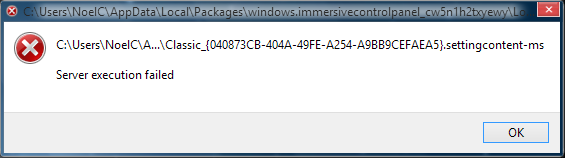
An attempted restart hangs with the spinner and "Restarting" on the screen.
-Noel |
|
|
Forum: Classic Start Menu Topic: Classic Shell 4.1.0 Fails After KB3000850 update on Win 8.1 |
| NoelC |
|
Posted: Wed Nov 19, 2014 7:17 am
|
|
Replies: 5
Views: 5514
|
| There's a big optional Windows Update available now: KB300850 http://support.microsoft.com/kb/3000850 This looks like the rough equivalent to the "Spring Update" we saw early this year. Only thing is it's NOT required to enable further updates this time around. But it does list a lot of fi... |
|
|
Forum: Classic Start Menu Topic: Feature Suggestion: "Run As Administrator" by default |
| NoelC |
|
Posted: Wed Nov 19, 2014 7:03 am
|
|
Replies: 6
Views: 2390
|
| >Is holding down Ctrl and Shift too much to ask? Yes. Oversimplifying the question into such black and white choices isn't really helpful. Clearly you created the product because you found the answer to the following question "yes": Is using Windows without Classic Shell too much to ask? T... |
|
|
Forum: Classic Start Menu Topic: Feature Suggestion: "Run As Administrator" by default |
| NoelC |
|
Posted: Tue Nov 18, 2014 9:33 pm
|
|
Replies: 6
Views: 2390
|
| Yes, but you do offer right-click, Run As Administrator, right? I'm only asking for an optional change. You could even make it a hidden option if you're concerned people will abuse it (e.g., a registry change). Please think about it a bit more. You yourself just identified that there are cases where... |
|
|
Forum: Classic Start Menu Topic: Feature Suggestion: "Run As Administrator" by default |
| NoelC |
|
Posted: Tue Nov 18, 2014 6:05 pm
|
|
Replies: 6
Views: 2390
|
| Of course, it should be an option, but there are those of us who really don't screw up our own computers by being full-time admins, and would really, really find it nice to be able to have the default case for anything started via Classic Shell be settable to run elevated. For a long time - to this ... |
|
|
Forum: Classic Start Menu Topic: Classic Shell on Windows 10 |
| NoelC |
|
Posted: Fri Nov 14, 2014 4:13 pm
|
|
Replies: 217
Views: 1038017
|
Yep, it runs. I just did a repair. Guess I can take it back out of the Task Scheduler...
-Noel |
|
|
Forum: Classic Start Menu Topic: Classic Shell on Windows 10 |
| NoelC |
|
Posted: Fri Nov 14, 2014 3:53 pm
|
|
Replies: 217
Views: 1038017
|
| Someone else reported that the Start Menu runs fine if the files are copied over from an existing installation and ClassicStartMenu.exe is executed but I haven't verified it. I can confirm that it works just fine (just grab the files from Windows.old before Microsoft auto-deletes them). I've even m... |
|
|
Forum: Classic Start Menu Topic: Classic Shell on Windows 10 |
| NoelC |
|
Posted: Wed Nov 12, 2014 3:23 pm
|
|
Replies: 217
Views: 1038017
|
No longer compatible with Win 10 build 9879.
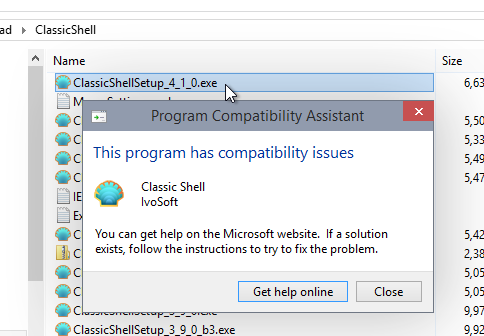
I posted in the other sub-forum, but this is probably where I should have put it.
-Noel |
|
|
Forum: Classic Start Menu Topic: Classic Shell on Windows 10 |
| NoelC |
|
Posted: Thu Nov 06, 2014 6:24 pm
|
|
Replies: 217
Views: 1038017
|
| It's Windows 6.4, the 4th update to Vista. Except less pretty and rather less functional. I have to agree with the poster above who said they wouldn't use Windows 8+ if it weren't for Classic Shell. Exactly my thoughts. It's nice to be able to keep current and have the old functionality instead of ... |
|
|
Forum: Classic Start Menu Topic: Classic Shell on Windows 10 |
| NoelC |
|
Posted: Fri Oct 17, 2014 8:37 pm
|
|
Replies: 217
Views: 1038017
|
| Within the constraint IVO mentioned, ClassicShell works amazingly well in Windows 10 Enterprise x64 Technical Preview. I think it's a testament to how well programmed it is that everything works. It even solves the issue where an auto-hidden Taskbar is reluctant to come out if you push the mouse cur... |
|
|
Forum: Classic Start Menu Topic: Classic Shell on Windows 10 |
| NoelC |
|
Posted: Fri Oct 03, 2014 9:06 am
|
|
Replies: 217
Views: 1038017
|
I edited my post above... You've already fixed it!
-Noel |
|
|
Forum: Classic Start Menu Topic: Classic Shell on Windows 10 |
| NoelC |
|
Posted: Fri Oct 03, 2014 8:50 am
|
|
Replies: 217
Views: 1038017
|
Ivo wrote: The "Windows XP Classic" style for the navigation pane causes the folder icons to become corrupted
By the way the folder icons in the Navigation Pane don't look quite right themselves during transitions, without any influence of Classic Shell (which I haven't installed yet).
-Noel |
|
|
Forum: Classic Start Menu Topic: Classic Shell on Windows 10 |
| NoelC |
|
Posted: Fri Oct 03, 2014 8:46 am
|
|
Replies: 217
Views: 1038017
|
| Woohoo that's a testament to your clean implementation, Ivo, that it already works so well on the TP. Well done. I've had just about enough of the "new" Microsoft Start menu. It's better than nothing but only about 20% as good as what you've already got in Classic Shell. Edit: I've just in... |
|
|
Forum: Classic Explorer Topic: Navigation Pane Entries Jump When Network Expands |
| NoelC |
|
Posted: Sun Feb 16, 2014 2:55 am
|
|
Replies: 4
Views: 2756
|
Wondering if you've ever had a chance to look this issue over, Ivo...
-Noel |
|
|
Forum: Classic Explorer Topic: Another plea for a glow for Win 8.1 File Explorer titles |
| NoelC |
|
Posted: Sat Feb 01, 2014 5:27 am
|
|
Replies: 5
Views: 4284
|
| Thanks for your response Jcee. I'm on Windows 8.1. My understanding is that a custom theme can supply a glow for ribbon window title backgrounds, but the stock Windows 8.1 Aero theme does not have it. I don't know what custom theme you're using, but I don't run a custom theme. I use only the theme a... |
|
|
Forum: Classic Explorer Topic: Another plea for a glow for Win 8.1 File Explorer titles |
| NoelC |
|
Posted: Wed Jan 29, 2014 11:26 am
|
|
Replies: 5
Views: 4284
|
| Ivo, please consider trying to find a way to place a glow behind the title of File Explorer windows. I know I've asked this before. I know it doesn't fit that well with what ClassicShell does for File Explorer now. I imagine this is a low priority, because probably fairly few folks (so far) use Aero... |
|
|
Forum: Classic Start Menu Topic: Can ClassicShell Better Enable Aero Glass for Win 8.1? |
| NoelC |
|
Posted: Mon Jan 27, 2014 9:39 am
|
|
Replies: 13
Views: 9338
|
4.0.4 works like a charm. Now the taskbar has the same coloring and density as an active Window title bar.
Thank you!
-Noel |
|
|
Forum: Classic Explorer Topic: change colour of out-of-focus selected treeView item(win8.1) |
| NoelC |
|
Posted: Fri Jan 17, 2014 11:37 pm
|
|
Replies: 5
Views: 4777
|
Consider calibrating your monitor. The gray color on a properly calibrated monitor isn't hard to spot.
-Noel |
|
|
Forum: Classic Explorer Topic: Navigation Pane Entries Jump When Network Expands |
| NoelC |
|
Posted: Sat Jan 04, 2014 9:07 pm
|
|
Replies: 4
Views: 2756
|
Sorry about not getting back to you sooner. I'd forgotten I'd made this post.
It's before Network, up in the folder set that's rooted in This PC.
-Noel |
|
|
Forum: Classic Explorer Topic: Navigation Pane Entries Jump When Network Expands |
| NoelC |
|
Posted: Wed Jan 01, 2014 2:51 pm
|
|
Replies: 4
Views: 2756
|
| ClassicShell makes the jumping behavior better, but there's still one case where the navigation pane entries move out from under you, even in Win 8.1. Specifically, if you close Explorer with the Network namespace expanded, then when you open Explorer again it will auto-expand Network again, after t... |
|
|
Forum: Classic Start Menu Topic: Can ClassicShell Better Enable Aero Glass for Win 8.1? |
| NoelC |
|
Posted: Sun Dec 29, 2013 5:27 pm
|
|
Replies: 13
Views: 9338
|
Thanks very much for coordinating Taskbar coloring in your two fine tools, guys.
-Noel |
|
|
Forum: Classic Start Menu Topic: Can ClassicShell Better Enable Aero Glass for Win 8.1? |
| NoelC |
|
Posted: Mon Dec 23, 2013 8:58 pm
|
|
Replies: 13
Views: 9338
|
| Sorry, I've not remembered to get back here before now. I don't believe the same issue exists with his released Windows 8 product, just the Windows 8.1 version nearing completion. You're probably right to await his final release. Unless something new pops up that should be very soon. BigMuscle's Aer... |
|
|
Forum: Classic Start Menu Topic: Can ClassicShell Better Enable Aero Glass for Win 8.1? |
| NoelC |
|
Posted: Mon Dec 23, 2013 10:24 am
|
|
Replies: 13
Views: 9338
|
| I can see how you might feel that way, but from a user's perspective, the two packages fit together VERY well, and I think both your goals are the same - make Windows 8 better to use. A code snippet has been posted into the thread identified that describes "setting accent" (or rather, how ... |
|
|
Forum: Classic Start Menu Topic: Can ClassicShell Better Enable Aero Glass for Win 8.1? |
| NoelC |
|
Posted: Mon Dec 23, 2013 4:31 am
|
|
Replies: 13
Views: 9338
|
I'm guessing neither of you product developers is going to directly reach out to one another. That's a pity, though it's quite a minor thing, and I don't personally mind the partially transparent non-blurred look of the Taskbar myself.
-Noel |
|
|
Forum: Classic Start Menu Topic: Can ClassicShell Better Enable Aero Glass for Win 8.1? |
| NoelC |
|
Posted: Mon Dec 16, 2013 11:20 am
|
|
Replies: 13
Views: 9338
|
| Due to a change in scope of the Aero Glass for Windows 8.1 product, the author is no longer able to blur the Taskbar unless the ClassicShell Disable Taskbar Transparency option is set. At the moment this setting causes the Taskbar to have the blur effect but with somewhat less translucency than it o... |
|
|
Forum: Classic Explorer Topic: What Might It Take To Bring Back "Previous Versions" |
| NoelC |
|
Posted: Sun Dec 08, 2013 12:54 pm
|
|
Replies: 3
Views: 2941
|
| I should post a warning... After having exercised the above, my next backup failed with the message: The backup operation that started at '2013-12-08T11:43:23.765618100Z' has failed with following error code '0x8078014B' (There was a failure in creating a directory on the backup storage locatio... |
|
|
Forum: Classic Explorer Topic: What Might It Take To Bring Back "Previous Versions" |
| NoelC |
|
Posted: Sat Dec 07, 2013 4:01 pm
|
|
Replies: 3
Views: 2941
|
| I don't really care whether restore points are complete or not, given that a -vssFull system image backup is. And it turns out to be as trivial as accessing one's drive via a UNC name (e.g., as though it is a server). In my case, doing Properties on a file in a File Explorer window opened to \\NoelC... |
|
|
Forum: Classic Explorer Topic: What Might It Take To Bring Back "Previous Versions" |
| NoelC |
|
Posted: Fri Dec 06, 2013 11:20 am
|
|
Replies: 3
Views: 2941
|
| Microsoft removed easy shadow copy access from Windows 8+ by eliminating the Previous Versions panel from within Explorer "Properties"... http://noel.prodigitalsoftware.com/ForumPosts/PreviousVersionsRemoved.png This facility provided access to Restore Points AND also to System Image backu... |
|
|
Forum: Classic Explorer Topic: File Explorer Confirmation Dialogs to the Top? |
| NoelC |
|
Posted: Fri Nov 29, 2013 9:51 am
|
|
Replies: 8
Views: 4825
|
GauravK wrote: Maybe it's an issue with 7-Zip.
Could well be. There was a time when I was young and energetic and I'd take a look at the sources, but now... Time is always so short.
-Noel |
|
|
Forum: Classic Explorer Topic: File Explorer Confirmation Dialogs to the Top? |
| NoelC |
|
Posted: Thu Nov 28, 2013 7:36 pm
|
|
Replies: 8
Views: 4825
|
| Found something PerigeeCopy breaks. I dragged some files out of 7-Zip and into a folder, using PerigeeCopy as the default drop handler, and it looked like it worked. Trouble is, the files didn't show up in the folder. For now I've uninstalled this tool and I'll just deal with the pop-behind windows.... |
|
|
Forum: Classic Explorer Topic: File Explorer Confirmation Dialogs to the Top? |
| NoelC |
|
Posted: Tue Nov 26, 2013 5:24 pm
|
|
Replies: 8
Views: 4825
|
| PerigeeCopy looks interesting... If I understand the instructions correctly, it can be set to be the default drag/drop handler. Is that your experience? And have you tried it with Win 8.1? I think I'll test it in a VM. Should be interesting. Edit: Seems to work in Win 8.1 , though I got a strange er... |
|
|
Forum: Classic Explorer Topic: File Explorer Confirmation Dialogs to the Top? |
| NoelC |
|
Posted: Tue Nov 26, 2013 10:25 am
|
|
Replies: 8
Views: 4825
|
| Hi Ivo, I know at one time (with Win 7 and earlier) ClassicShell's ClassicExplorer piece offered the ability to change the dialogs, and that was good but alas that seems to be in the past for Windows 8 users. However, one of the things I've noticed in Windows 8.1 is that sometimes the progress or co... |
|
|
Forum: Classic Start Menu Topic: Donation Returned |
| NoelC |
|
Posted: Mon Nov 18, 2013 4:06 am
|
|
Replies: 1
Views: 1240
|
| I tried to send you a bit of scratch, Ivo, using the button I found on the home page here. This just came in: On Oct 18, 2013, you sent a payment to < Ivo's email address > for $20.00 USD. The funds have been returned to your account. This payment was returned for the following reason(s): < Ivo's em... |
|
|
Forum: Classic Explorer Topic: Inability To Set Explorer in Win 8.1 To Use "Tree" Control |
| NoelC |
|
Posted: Sat Nov 16, 2013 10:04 pm
|
|
Replies: 7
Views: 5974
|
| Just to follow up, I have Windows 8.1 Pro now, and I'm able to switch on the list control in the Files pane through the use of Folder Options X. Not as information-dense as XP, but getting there. http://Noel.ProDigitalSoftware.com/ForumPosts/Win8ExplorerListView.png Now what would be simply awesome ... |
|
|
| Sort by: |

 Login
Login Register
 FAQ
FAQ Search
 Members