| Author |
Message |
Forum: Classic Start Menu Topic: Mouse Stops at Corner Between Monitors in Multi-Monitor Sys |
| NoelC |
|
Posted: Sat Nov 16, 2013 9:43 pm
|
|
Replies: 7
Views: 3374
|
Just trying it now...
Seems to respond okay without classicshell.net being in the Compatibility View list.
Does this board use BBSCODE? Let's see...
Quote: This would be quoted
An image should follow...
-Noel |
|
 |
Forum: Classic Start Menu Topic: Mouse Stops at Corner Between Monitors in Multi-Monitor Sys |
| NoelC |
|
Posted: Fri Nov 15, 2013 1:07 pm
|
|
Replies: 7
Views: 3374
|
Okay, I added classicshell.net to compatibility view.
Yes, this is MUCCCCCHHHHH better! Thanks again to Gaurav.
I like to think I keep on top of things, but Gaurav, you must be trying even harder. You seem to have all the really good answers before anyone else does!
-Noel |
|
|
Forum: Classic Start Menu Topic: Mouse Stops at Corner Between Monitors in Multi-Monitor Sys |
| NoelC |
|
Posted: Fri Nov 15, 2013 1:05 pm
|
|
Replies: 7
Views: 3374
|
| Yes this is the expected Windows 8/8.1 behavior. It restricts the mouse pointer from moving to the next monitor for a certain number of pixels from the top or bottom edge (I think it's 6 pixels by default). It is a tweakable registry value from 0 to 20 pixels. The string value 'MouseCornerClipLengt... |
|
|
Forum: Classic Start Menu Topic: Mouse Stops at Corner Between Monitors in Multi-Monitor Sys |
| NoelC |
|
Posted: Thu Nov 14, 2013 10:15 pm
|
|
Replies: 7
Views: 3374
|
| I've just put in Windows 8.1 and noticed something... If I move my mouse along the top or bottom of the left or right monitor, it stops when it hits the corner. It doesn't smoothly flow to the other monitor. If it's a little bit away from the edge it goes across okay. Is this typical / to be expecte... |
|
|
Forum: Classic Explorer Topic: [SUGGESTION] Option to hide Windows Explorer command bar |
| NoelC |
|
Posted: Sat Oct 12, 2013 3:26 am
|
|
Replies: 8
Views: 11075
|
| With all due respect I find the answer "it requires hacking so we don't want to do it" a bit unsatisfying, since ClassicShell already watches events and gets involved in the intimate details of what's happening inside Explorer. But I do understand that it's complicated to try to alter the ... |
|
|
Forum: Classic Explorer Topic: Any Way to Remove the Now Obsolete Explorer Status Bar? |
| NoelC |
|
Posted: Mon Sep 30, 2013 7:23 am
|
|
Replies: 7
Views: 5317
|
Ivo wrote: I don't remember for certain, but I think the status bar is not shown by default. So the assumption goes that if you know how to turn it on in the first place you should know how to turn it off.
Thing is time passes, brain cells die. 
-Noel |
|
|
Forum: Classic Shell 4.0 beta Topic: ClassicShellSetup_3_9_3.exe is unsafe to download... |
| NoelC |
|
Posted: Tue Sep 17, 2013 9:25 am
|
|
Replies: 14
Views: 10813
|
It's refreshing to converse with others who really "get it". Thank you, Ivo.
-Noel |
|
|
Forum: Classic Explorer Topic: Inability To Set Explorer in Win 8.1 To Use "Tree" Control |
| NoelC |
|
Posted: Tue Sep 17, 2013 9:09 am
|
|
Replies: 7
Views: 5974
|
| Hm, Windows 8.1 Enterprise Preview (I don't have RTM yet) doesn't seem to want to enable List view no matter what. Must be a preview-only thing. I'm glad to hear the functionality is restored in Windows 8.1 RTM. I still urge Ivo to consider trying to adjust the vertical spacing even without the List... |
|
|
Forum: Classic Explorer Topic: Inability To Set Explorer in Win 8.1 To Use "Tree" Control |
| NoelC |
|
Posted: Tue Sep 17, 2013 8:57 am
|
|
Replies: 7
Views: 5974
|
| . (It goes without saying that we bear no responsibility for anything that happens to your system, this support is only for your convenience) :) Thank you. Rest assured I test with VMs that can be instantly restored via snapshots, or simply thrown away. I don't even use any flavor of Windows 8 for ... |
|
|
Forum: Classic Explorer Topic: Inability To Set Explorer in Win 8.1 To Use "Tree" Control |
| NoelC |
|
Posted: Tue Sep 17, 2013 8:54 am
|
|
Replies: 7
Views: 5974
|
| Thanks for your quick responses, guys. You're right, Ivo - "List Control". Sorry. I was also thinking Microsoft may have removed that code, but Gaurav has just renewed my hope! No plan? Darn. Since you have programmed ClassicShell to be able to reduce the vertical spacing in the Navigation... |
|
|
Forum: Classic Shell 4.0 beta Topic: ClassicShellSetup_3_9_3.exe is unsafe to download... |
| NoelC |
|
Posted: Tue Sep 17, 2013 8:32 am
|
|
Replies: 14
Views: 10813
|
| I wonder if Microsoft may test the waters from time to time to see if they can up the resistance of Windows to load software not delivered by them through their App Store. Perhaps they listen for screams, and thus get an idea of how painful it will be for them when they ultimately close the door per... |
|
|
Forum: Classic Explorer Topic: Inability To Set Explorer in Win 8.1 To Use "Tree" Control |
| NoelC |
|
Posted: Tue Sep 17, 2013 8:02 am
|
|
Replies: 7
Views: 5974
|
| Up through Windows 8 I've been able to find software to tweak Windows into using the standard "Tree" control for File Explorer windows in the Files pane (right side) when using Details view . One program that XPClient found (thanks) to do it was "Folder Options X". Along with the... |
|
|
Forum: Classic Explorer Topic: Any Way to Remove the Now Obsolete Explorer Status Bar? |
| NoelC |
|
Posted: Tue Sep 17, 2013 7:48 am
|
|
Replies: 7
Views: 5317
|
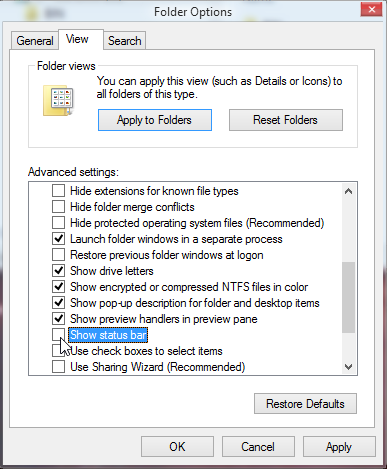
Never mind, I found it.
-Noel |
|
|
Forum: Classic Explorer Topic: Any Way to Remove the Now Obsolete Explorer Status Bar? |
| NoelC |
|
Posted: Tue Sep 17, 2013 7:40 am
|
|
Replies: 7
Views: 5317
|
| I applaud your having recreated the status bar at the bottom of File Explorer windows. Awesome! Is there a way to get rid of the half-baked status bar Windows 8 puts in there? The things it shows I don't need, and it's now chewing up space I'd rather have to show files and folders. Seems to me it's ... |
|
|
Forum: Classic Start Menu Topic: Aero Glass for Win8 |
| NoelC |
|
Posted: Sun Aug 25, 2013 9:51 pm
|
|
Replies: 2
Views: 5033
|
| Just want to report back that ClassicShell 3.9.x works GREAT with the Aero Glass for Win8 release version (which I have an early copy of). What a pleasure the two tools (ClassicShell and Aero Glass for Win8) together bring to using the Windows 8 desktop by comparison to the out-of-box experience. ht... |
|
|
Forum: Classic Shell 4.0 beta Topic: ClassicShellSetup_3_9_3.exe is unsafe to download... |
| NoelC |
|
Posted: Sun Aug 25, 2013 9:34 pm
|
|
Replies: 14
Views: 10813
|
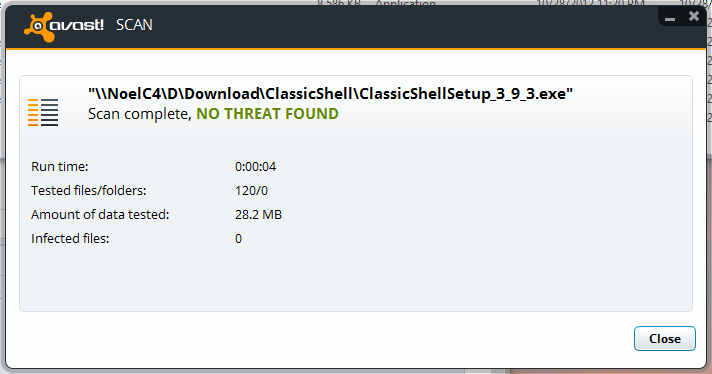
FYI, a quality AV scanner deems it healthy...
-Noel |
|
|
Forum: Classic Shell 4.0 beta Topic: ClassicShellSetup_3_9_3.exe is unsafe to download... |
| NoelC |
|
Posted: Sun Aug 25, 2013 9:26 pm
|
|
Replies: 14
Views: 10813
|
| ONLY if I go into Internet Explorer's Advanced configuration settings and disable the SmartScreen Filter setting. There is not any way I can find otherwise. This is a subtle but significant change, as - like you - I have been able to go through a More Info link or something and choose to bypass the ... |
|
|
Forum: Classic Shell 4.0 beta Topic: ClassicShellSetup_3_9_3.exe is unsafe to download... |
| NoelC |
|
Posted: Sun Aug 25, 2013 9:15 pm
|
|
Replies: 14
Views: 10813
|
| Not safe, basically means its a new file... and hasn't been confirmed to be safe.. You and I know that, but what I'm pointing out is that being deemed "unsafe" isn't the same as "not yet confirmed to be safe". There are subtleties of the language at play here, and Microsoft is s... |
|
|
Forum: Classic Shell 4.0 beta Topic: ClassicShellSetup_3_9_3.exe is unsafe to download... |
| NoelC |
|
Posted: Sun Aug 25, 2013 8:34 pm
|
|
Replies: 14
Views: 10813
|
| The whole message IE10 in Windows 8 emits is this: http://Noel.ProDigitalSoftware.com/ForumPosts/ErrorMessage.png I guess you must have upset someone at Microsoft. Personally this kind of thing irritates me greatly, because not being deemed "safe" by mother Microsoft isn't quite the same t... |
|
|
Forum: Classic Shell 4.0 beta Topic: New build for 4.0 beta |
| NoelC |
|
Posted: Wed Jul 03, 2013 8:33 am
|
|
Replies: 20
Views: 10508
|
| By the way, the final screen of the installer has a link in it in which the word "Classic" is misspelled.-Noel |
|
|
Forum: Classic Shell 4.0 beta Topic: All's Well on Windows 8 and 8.1 |
| NoelC |
|
Posted: Wed Jul 03, 2013 8:25 am
|
|
Replies: 4
Views: 3580
|
I've discussed this with the author of Aero Glass for Win8 as well.
Thing is, not everyone may want that product, and (as I showed above) a usability problem can easily be created by choosing a dark color even with the standard Windows 8 Aero implementation.
-Noel |
|
|
Forum: Classic Shell 4.0 beta Topic: All's Well on Windows 8 and 8.1 |
| NoelC |
|
Posted: Wed Jul 03, 2013 8:15 am
|
|
Replies: 4
Views: 3580
|
| I've got the beta on both Windows 8.0 and 8.1 test systems, and it seems to work just fine. I haven't found any bugs. On Windows 8.0 I have the Search Indexer disabled, which is a bit non-standard, but with my fast SSD-based system the searches are still virtually instantaneous. Good job! By the way... |
|
|
Forum: Classic Shell 4.0 beta Topic: Classic Shell beta is available for download |
| NoelC |
|
Posted: Sun Jun 30, 2013 11:15 am
|
|
Replies: 20
Views: 10010
|
| Thanks for inviting me into the beta testing, Gaurav and Ivo. Initial report, Windows 8 Enterprise system with Aero Glass for Win8 installed : 1. The install appeared to go fine, from what I can see. The only unexpected thing was that the installer let me know Internet Explorer was still running (I ... |
|
|
Forum: Classic Start Menu Topic: Aero Glass for Win8 |
| NoelC |
|
Posted: Fri May 17, 2013 4:14 pm
|
|
Replies: 2
Views: 5033
|
| There's a new product in development that adds Aero Glass effects back to Windows 8: http://www.msfn.org/board/topic/161788-aero-glass-for-win8-rc1/ ClassicShell emulates a "glass" effect by providing partial transparency, but doesn't invoke the blurring. Speculation is that it just doesn'... |
|
|
Forum: Classic Explorer Topic: Title for File Explorer Windows with Background Glow? |
| NoelC |
|
Posted: Mon Apr 08, 2013 4:06 pm
|
|
Replies: 6
Views: 6092
|
| The titlebar glow is part of the theme so you can get a theme with white text, or with title-bar glow Thanks, Jcee, but as you can see I've already modified my theme to have the glow. Something else is afoot here that's causing the glow not to be rendered for certain applications. http://Noel.ProDi... |
|
|
Forum: Classic Explorer Topic: Title for File Explorer Windows with Background Glow? |
| NoelC |
|
Posted: Mon Apr 08, 2013 4:02 pm
|
|
Replies: 6
Views: 6092
|
| In Windows 8 Explorer has its title already visible, so Classic Shell does nothing. Oops - you're right of course. I've made a mistake then in assuming it was showing because I was enabling it via another application (too many different systems). I've noticed the glow missing from the Wordpad appli... |
|
|
Forum: Classic Explorer Topic: Title for File Explorer Windows with Background Glow? |
| NoelC |
|
Posted: Mon Apr 08, 2013 3:38 pm
|
|
Replies: 6
Views: 6092
|
| Thanks for the quick response. The "show title in Explorer" feature of Classic Shell (for Vista and Windows 7) simply enables the title, doesn't actually draw it. So does that just not work in Windows 8? I imagine if you could get Explorer to draw it itself it would have the proper glow. -... |
|
|
Forum: Classic Explorer Topic: Title for File Explorer Windows with Background Glow? |
| NoelC |
|
Posted: Mon Apr 08, 2013 3:27 pm
|
|
Replies: 6
Views: 6092
|
| Hi Ivo, Up to now I have been using another utility to put titles (i.e., the path) on my Windows 8 File Explorer windows. Unfortunately, that utility is not capable of adding a background glow, which hasn't been a problem right up until I tried also using the software in development called "Aer... |
|
|
| Sort by: |

 Login
Login Register
 FAQ
FAQ Search
 Members