| Author |
Message |
Forum: Classic Start Menu Topic: Keep start menu icon (metro) : with colors |
| Gaurav |
|
Posted: Fri Feb 08, 2013 11:14 pm
|
|
Replies: 3
Views: 4007
|
|
 |
Forum: Classic Explorer Topic: Win 7: "Always show details" not working |
| Gaurav |
|
Posted: Fri Feb 08, 2013 11:11 pm
|
|
Replies: 2
Views: 4182
|
| Also, make sure that from Internet Options in Control Panel -> Programs tab, Manage Addons dialog, all Classic Shell related addons are enabled. |
|
|
Forum: Feature Requests Topic: Danish Translation |
| Gaurav |
|
Posted: Thu Feb 07, 2013 9:06 pm
|
|
Replies: 4
Views: 5966
|
| Should have received an email from Ivo. |
|
|
Forum: Classic Explorer Topic: Copy UI - Windows 8 |
| Gaurav |
|
Posted: Thu Feb 07, 2013 7:43 am
|
|
Replies: 9
Views: 11112
|
| You *can* keep both by checking the topmost boxes but yes it's too many clicks and the buttons aren't even close to each other. Windows 8 did add skipping files based on the same date and size but it's not checked by default, nor does it save its last state. Calculating checksums for each and every ... |
|
|
Forum: Classic Explorer Topic: Copy UI - Windows 8 |
| Gaurav |
|
Posted: Thu Feb 07, 2013 5:20 am
|
|
Replies: 9
Views: 11112
|
| The Copy replacement UI was just that, just a UI on top of the new Vista/7 UI. In Windows 8, MS completely redesigned it again and while I hate the new one too (here's why: How the Windows 8 copy file conflict dialog slows you down ), it hasn't been replaced yet in Classic Shell. What I particularly... |
|
|
Forum: Classic Start Menu Topic: Customize Start Menu tab? |
| Gaurav |
|
Posted: Wed Feb 06, 2013 12:23 pm
|
|
Replies: 3
Views: 3761
|
| Classic Start Menu supports several ways of adding custom items of your choice. One way is to right click the Start button, click Open or Open All Users and paste or create shortcuts inside the Programs folder. You could create a Video Apps folder there in Explorer, and drag shortcuts there. Another... |
|
|
Forum: Feature Requests Topic: Apply button |
| Gaurav |
|
Posted: Wed Feb 06, 2013 12:22 pm
|
|
Replies: 2
Views: 4505
|
| Yes, almost all settings except Start Button, icon sizes and some others are applied instantly. |
|
|
Forum: Start Menu Skins Topic: Start8 Skin V2.5 |
| Gaurav |
|
Posted: Wed Feb 06, 2013 6:06 am
|
|
Replies: 39
Views: 55885
|
|
|
Forum: Feature Requests Topic: Administrative tools directly in Start Menu |
| Gaurav |
|
Posted: Wed Feb 06, 2013 6:01 am
|
|
Replies: 4
Views: 6807
|
| To add Admin Tools, here are the step-by-step instructions: 1. Open settings, go to Customize Start Menu tab. 2. Scroll all the way down in right column, locate "Custom Command", double click to add it or drag it. Position it up/down where you want it. 3. Now double click "CustomItem&... |
|
|
Forum: Classic Start Menu Topic: [Solved] View in Control Panel |
| Gaurav |
|
Posted: Wed Feb 06, 2013 5:15 am
|
|
Replies: 3
Views: 9471
|
| So you want to change it to Category view? Open Settings, go to Customize Start Menu tab. Double click ControlPanelItem in left column and change "Command" from control_panel to control_panel_categories from the dropdown. |
|
|
Forum: Classic Explorer Topic: Toolbar Placed to Left Side |
| Gaurav |
|
Posted: Tue Feb 05, 2013 9:04 pm
|
|
Replies: 6
Views: 6317
|
| Yes, so you can use the same trick to move to the right. Open any folder like Control Panel, unlock and move it to the right along the same row as the menu bar and lock it again. Thereafter for Ribbon-enabled folders, it will stay on the right. |
|
|
Forum: Feature Requests Topic: Polish translation |
| Gaurav |
|
Posted: Mon Feb 04, 2013 11:17 pm
|
|
Replies: 2
Views: 3988
|
| Should have received an email. |
|
|
Forum: Feature Requests Topic: Turkish Translate |
| Gaurav |
|
Posted: Mon Feb 04, 2013 10:55 pm
|
|
Replies: 3
Views: 4701
|
| Should have received an email. |
|
|
Forum: Classic Explorer Topic: Is there an option to NOT remember folders view settings? |
| Gaurav |
|
Posted: Mon Feb 04, 2013 9:58 am
|
|
Replies: 2
Views: 4629
|
| As I understand you wish to apply the same view to all folders - Details view? In Windows 7, Windows 8 and Vista, folder view settings are saved for 5 different folder "templates" depending on their content. So open five folders, one each of the 5 types - containing General/Miscellaneous f... |
|
|
Forum: Classic Start Menu Topic: my icons scrample at every reboot - Win 8 Standard |
| Gaurav |
|
Posted: Sun Feb 03, 2013 9:32 pm
|
|
Replies: 3
Views: 3184
|
| Well the good news is you can use Classic Shell on Windows 7 as well and there in fact, it has more customizations available for the Explorer component. |
|
|
Forum: Start Buttons Topic: Classic Shell Old Logo Start Buttons |
| Gaurav |
|
Posted: Sun Feb 03, 2013 6:53 pm
|
|
Replies: 6
Views: 57797
|
| http://i.imgur.com/8MKDq3A.png Classic Shell Logo Start Buttons in various sizes and for thin taskbar at bottom or thick taskbar. At size 0 of Custom button, the width of the image is used. You can of course specify a custom size for any image. This button is Copyright © Ivo Beltchev. Do not redist... |
|
|
Forum: Classic Start Menu Topic: Missing programs |
| Gaurav |
|
Posted: Sun Feb 03, 2013 12:03 pm
|
|
Replies: 9
Views: 5784
|
| Oh!!!!! OK now I understand. You probably mean XP style of Classic menu when you said "XP mode". Yes, I completely mistook it for XP Mode feature of Virtual PC. My bad. In that case, ignore everything I said. As Ivo said, what program are you trying to find? Is it not under All Programs su... |
|
|
Forum: Start Buttons Topic: Vista Style Button |
| Gaurav |
|
Posted: Sun Feb 03, 2013 5:27 am
|
|
Replies: 10
Views: 34444
|
Nice 'pressed' state. It gives a real feeling of a pressed button.  |
|
|
Forum: Bug Reports Topic: Classic Shell Freeze on Windows 8 Pro 64 bit |
| Gaurav |
|
Posted: Sun Feb 03, 2013 2:25 am
|
|
Replies: 54
Views: 95304
|
| Explorer.exe is in C:\Windows. |
|
|
Forum: Classic Start Menu Topic: Mail Win8 |
| Gaurav |
|
Posted: Sun Feb 03, 2013 2:17 am
|
|
Replies: 9
Views: 5979
|
| Btw ruiman, there is a way to launch Metro apps from desktop or taskbar or ANY location using a third party free app called OblyTile. If you are interested, take a look here: http://winaero.com/blog/how-to-pin-modern-metro-apps-to-the-taskbar/ Note that this is unrelated to and unsupported by Classi... |
|
|
Forum: Feature Requests Topic: Increasing Start Menu Items |
| Gaurav |
|
Posted: Sun Feb 03, 2013 2:14 am
|
|
Replies: 3
Views: 4742
|
| Hmm. Having 20 Recent Programs can be limiting, especially if small icons are being used and there is space to display more items. |
|
|
Forum: Bug Reports Topic: Setting column width of main menu has no effect |
| Gaurav |
|
Posted: Sun Feb 03, 2013 2:05 am
|
|
Replies: 5
Views: 7388
|
| Do you want to control minimum width or maximum width? As Ivo said, the "Main menu width" controls maximum width, so you can set it as you want to a width beyond which if the program name goes, it will be truncated and shown as .... To set the Minimum width, there is not a setting availabl... |
|
|
Forum: Classic Start Menu Topic: Missing programs |
| Gaurav |
|
Posted: Sun Feb 03, 2013 1:58 am
|
|
Replies: 9
Views: 5784
|
| Your problem is related to Virtual PC, not Start Menu related. VM=Virtual machine. What you are using as "XP Mode" is a Virtual Machine running on Windows Virtual PC software which is available only for Windows 7. Okay, try this: 1. First shutdown Windows XP Mode. 2. Open "Windows Vir... |
|
|
Forum: Classic Start Menu Topic: Missing programs |
| Gaurav |
|
Posted: Fri Feb 01, 2013 11:32 pm
|
|
Replies: 9
Views: 5784
|
| Do the XP Mode icons appear in Windows 7's built-in Start Menu under "Windows Virtual PC" folder? If they appear in it, then they should show up in the Classic Start Menu as well. In your XP Mode VM settings from Virtual PC's folder, check if "Auto publish" of shortcuts from XP M... |
|
|
Forum: Bug Reports Topic: Classic Shell Freeze on Windows 8 Pro 64 bit |
| Gaurav |
|
Posted: Fri Feb 01, 2013 10:17 pm
|
|
Replies: 54
Views: 95304
|
| Gaby, thanks for persisting with troubleshooting this issue. The hangs also happen after Defender is disabled? Have you installed any other AV or firewall? ClassicStartMenu.exe injects itself in Explorer.exe process so your security program may be blocking that causing the hangs. |
|
|
Forum: Classic Start Menu Topic: Something Went Oops - Windows 8 |
| Gaurav |
|
Posted: Thu Jan 31, 2013 11:10 pm
|
|
Replies: 9
Views: 7257
|
| Yeah lots of users are reporting this. Over time, it just stops skipping the Start screen. Best solution is combination of UserInit and service, as Task Scheduler will also start it delayed even if you reduce the startup delay using this reg tweak: http://winaero.com/blog/how-to-reduce-the-startup-d... |
|
|
Forum: Start Buttons Topic: Original Windows 7 Orb Start Buttons of various sizes |
| Gaurav |
|
Posted: Wed Jan 30, 2013 9:03 pm
|
|
Replies: 1
Views: 264341
|
| Windows 7 Start Buttons of various sizes to this post: Small, Medium, Large and Extra Large and for thick-sized and thin taskbar. Preview: ( download the ZIP file to get all sizes of the button , don't save the image). The Windows logo is a copyright and trademark of Microsoft. It is being distribut... |
|
|
Forum: Bug Reports Topic: Sent to |
| Gaurav |
|
Posted: Wed Jan 30, 2013 3:10 am
|
|
Replies: 7
Views: 7363
|
| Oh you're right clicking a file in Explorer. Classic Shell does not modify Windows Explorer's right click menu in any way. Something might have deleted the contents of your Send To folder. Type shell:sendto into the Start Menu search box and see if it's empty. If it's empty, it means some other cont... |
|
|
Forum: Classic Start Menu Topic: Classic Shell stopped working |
| Gaurav |
|
Posted: Wed Jan 30, 2013 2:40 am
|
|
Replies: 18
Views: 12301
|
| Modern versions of Windows don't need a third party firewall. The built-in one is excellent, although it doesn't block outbound programs by default. You can install a free program like Windows7FirewallControl by Sphinx Software to block outbound connections in Windows Firewall and get a notification... |
|
|
Forum: Classic Start Menu Topic: Classic Shell stopped working |
| Gaurav |
|
Posted: Wed Jan 30, 2013 1:21 am
|
|
Replies: 18
Views: 12301
|
| I've also been using 7+TT without issue. Zone Alarm also often causes a lot of incompatibilities and problems with MANY programs from my personal experience. I would recommend uninstalling ZA temporarily to see if it works with ZA installed. |
|
|
Forum: Classic Explorer Topic: Toolbar Email button |
| Gaurav |
|
Posted: Wed Jan 30, 2013 12:49 am
|
|
Replies: 5
Views: 5571
|
| That app appears to require the Java runtime installed for it to work. Worked for me for Gmail. It gets saved as a draft on Gmail which you can continue composing. I tried the beta version, not the featured. Btw, note that any third party app recommendation are made purely for your convenience. Use ... |
|
|
Forum: Classic Start Menu Topic: How to enable multiple columns for pinned program folders? |
| Gaurav |
|
Posted: Wed Jan 30, 2013 12:12 am
|
|
Replies: 5
Views: 3426
|
| @Skyli, FYI, for that you need to add the item called "Recent Items" from the Customize Start Menu. That is the Recent programs list (even if it says "Recent Items"). You can definitely put it below the search box but it will be in a sub-menu as Ivo said. |
|
|
Forum: Classic Start Menu Topic: Classic Shell stopped working |
| Gaurav |
|
Posted: Wed Jan 30, 2013 12:09 am
|
|
Replies: 18
Views: 12301
|
| Do you have a third party anti-malware installed which may be blocking the Start Menu process? |
|
|
Forum: Feature Requests Topic: Improve the quality of checkboxes at 125/150% screen sizes. |
| Gaurav |
|
Posted: Tue Jan 29, 2013 10:42 am
|
|
Replies: 4
Views: 8127
|
| He probably means the checkboxes in the settings UI. Both checkboxes and radio buttons (as well as the icon used for every setting) looks pixelated at high DPI. Compared to Windows checkboxes in settings like Folder Options, they look terrible. Here's a screenshot comparing the two: http://i.imgur.c... |
|
|
Forum: Classic Start Menu Topic: How to enable multiple columns for pinned program folders? |
| Gaurav |
|
Posted: Tue Jan 29, 2013 10:36 am
|
|
Replies: 5
Views: 3426
|
| Btw, to do that in case you are finding it difficult, go to Customize Start Menu tab, scroll all the way down in the right column, add "Custom Command" and add the folder of your choice as a Link. You can also add a Library defined in Explorer (to combine more than one folder in a menu). T... |
|
|
Forum: Bug Reports Topic: Sent to |
| Gaurav |
|
Posted: Tue Jan 29, 2013 8:32 am
|
|
Replies: 7
Views: 7363
|
| Where are you right-clicking? A folder or directly a file? For folders that are located in both Start Menu folders - per user and All users, Send To isn't displayed. Also, if you are right clicking in the MRU list to access Send To, you must Shift+right click. |
|
|
Forum: Classic Start Menu Topic: Increasing Start Menu Items |
| Gaurav |
|
Posted: Tue Jan 29, 2013 5:36 am
|
|
Replies: 5
Views: 3353
|
| On the Special Items tab, change the setting "Max recent programs". |
|
|
Forum: Classic Start Menu Topic: Some program icons is showed as white squares. |
| Gaurav |
|
Posted: Mon Jan 28, 2013 8:18 pm
|
|
Replies: 25
Views: 19085
|
| Hmm, after you reinstalled all the software which uses MSI installer, the last step would be to delete/reset the Explorer icon cache again. That should bring back all icons. Anyways, it means it wasn't a Classic Shell issue and glad that you can get your icons back. |
|
|
Forum: Classic Start Menu Topic: Cannot skip Metro screen |
| Gaurav |
|
Posted: Mon Jan 28, 2013 8:16 pm
|
|
Replies: 22
Views: 32867
|
|
|
Forum: Classic Start Menu Topic: Separator in Program menu |
| Gaurav |
|
Posted: Mon Jan 28, 2013 6:36 am
|
|
Replies: 9
Views: 6170
|
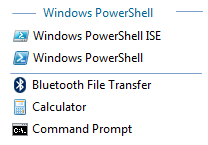
Yes I agree. A separator along with a way to label the separator optionally, and change it to blue like jumplist headers are done will be awesome.
 |
|
|
Forum: Bug Reports Topic: pin to startmenu items do not show in the pin to start menu |
| Gaurav |
|
Posted: Mon Jan 28, 2013 3:42 am
|
|
Replies: 5
Views: 10542
|
| The right click "Pin to Start" item only pins to the Windows 8 Start screen. To get "Pin to Classic Start Menu" item for versions 3.6.x, follow the tutorial here: http://www.classicshell.net/forum/viewtopic.php?f=5&t=61. Another way to pin is to simply drag and drop items to ... |
|
|
Forum: Classic Start Menu Topic: Question regarding Search |
| Gaurav |
|
Posted: Mon Jan 28, 2013 1:46 am
|
|
Replies: 6
Views: 4252
|
| Btw, you can already execute them from the search box although I agree if they return in search results, it will be even better. |
|
|
Forum: Classic Explorer Topic: Toolbar Email button |
| Gaurav |
|
Posted: Mon Jan 28, 2013 1:19 am
|
|
Replies: 5
Views: 5571
|
|
|
Forum: Classic Start Menu Topic: Some program icons is showed as white squares. |
| Gaurav |
|
Posted: Sun Jan 27, 2013 6:36 am
|
|
Replies: 25
Views: 19085
|
| Thanks for following up with troubleshooting this issue so far. According to http://msdn.microsoft.com/en-us/library/windows/desktop/aa371182%28v=vs.85%29.aspx, some applications may change the option codes for the REINSTALLMODE property so a Repair installation would not be the same thing as uninst... |
|
|
Forum: Classic Start Menu Topic: Some program icons is showed as white squares. |
| Gaurav |
|
Posted: Sun Jan 27, 2013 3:40 am
|
|
Replies: 25
Views: 19085
|
| Since they are all MSI shortcuts, it looks like icons which are cached for these shortcuts in the C:\Windows\Installer folder got deleted somehow. You could try doing a "Repair" installation from Control Panel -> Programs and Features for each of the softwares which show blank icons. You m... |
|
|
Forum: Classic Start Menu Topic: Systemsteuerung anklicken |
| Gaurav |
|
Posted: Sat Jan 26, 2013 10:03 pm
|
|
Replies: 3
Views: 3103
|
| Do you wish to show those items as a menu, not a link? Go to Special items tab and set "Display as a link" for the ones you want. |
|
|
Forum: Classic Start Menu Topic: Some program icons is showed as white squares. |
| Gaurav |
|
Posted: Sat Jan 26, 2013 10:00 pm
|
|
Replies: 25
Views: 19085
|
| Are these are MSI advertised shortcuts? (Is the target field in Properties greyed out for these shortcuts for which you get white icons?) Did you restart after deleting the cache? :) Also, if that doesn't work, maybe it's a permissions issue? Try using a tool like TakeOwnershipEx: http://winaero.com... |
|
|
Forum: Feature Requests Topic: Restore option to 'keep the taskbar on top..." |
| Gaurav |
|
Posted: Sat Jan 26, 2013 10:30 am
|
|
Replies: 1
Views: 4186
|
|
|
Forum: Feature Requests Topic: Would like option to 'Remember each folder's view settings' |
| Gaurav |
|
Posted: Sat Jan 26, 2013 10:21 am
|
|
Replies: 1
Views: 4008
|
| The registry equivalent to "Remember each folder's view settings" is still intact. MS just took out the option from Folder Options. Go to HKEY_CURRENT_USER\Software\Microsoft\Windows\CurrentVersion\Explorer\Advanced. Add a DWORD value called ClassicViewState and set it to 1. Log off and lo... |
|
|
Forum: Classic Start Menu Topic: SOLVED :) lol |
| Gaurav |
|
Posted: Sat Jan 26, 2013 8:47 am
|
|
Replies: 8
Views: 4781
|
| From the screenshot, it is obvious that it is Start8, not the "original" Start Menu. There is no original Start Menu in Windows 8. Classic Shell is not supported along with other Start menu products installed. To make it stop appearing in the bottom left corner, either disable the conflict... |
|
|
| Sort by: |

 Login
Login Register
 FAQ
FAQ Search
 Members