| Author |
Message |
Forum: Feature Requests Topic: Text Shadows |
| Jcee |
|
Posted: Mon Oct 17, 2016 4:36 am
|
|
Replies: 7
Views: 2010
|
Yea.. but aero glass 8.1 isn't free... and hooks quite deep into your system...
Also this forum is pretty lax, so if you don't spam or post nudity you should be alright  |
|
 |
Forum: Feature Requests Topic: Text Shadows |
| Jcee |
|
Posted: Sun Oct 16, 2016 7:50 pm
|
|
Replies: 7
Views: 2010
|
| Looks like about 40% of windows machines are on windows 8+, and about 50% on 7, with 10% everything else :P so 7 still has 10 beat by a significant margin.. but that is still ALOT of users who would benefit from such a feature... @ tiles :P I meant PATTERNS my bad. (and I think I recall your thread,... |
|
|
Forum: Feature Requests Topic: Text Shadows |
| Jcee |
|
Posted: Sun Oct 16, 2016 6:07 pm
|
|
Replies: 7
Views: 2010
|
| I remembered that shortly after the post, but my request is still valid for 8-10 :P even if it's not a particularly easy one to fulfill. I believe the need is greater than ever (with so many people on windows 8+) When I first posted this request; windows 8 was new and didn't have the same # of insta... |
|
|
Forum: Start Menu Skins Topic: Request: Sonic skin |
| Jcee |
|
Posted: Sun Oct 16, 2016 5:58 pm
|
|
Replies: 15
Views: 8819
|
Those were remnants from when I was testing the minimum/maximum widths of the start menu to make sure the pattern repeated properly  |
|
|
Forum: Start Menu Skins Topic: Request: Sonic skin |
| Jcee |
|
Posted: Sun Oct 16, 2016 3:20 pm
|
|
Replies: 15
Views: 8819
|
| And here is a taskbar skin and start button (made by kamifox1: http://kamifox1.deviantart.com/art/Sonic-the-Hedgehog-start-button-orb-397408497) But Im attaching it here, because It needed a little cropping to fit better.. Check 'align to corner of screen' and the best size is between 45 and 80 EDIT... |
|
|
Forum: Classic Start Menu Topic: [Solved] Height of start menu |
| Jcee |
|
Posted: Sun Oct 16, 2016 2:01 am
|
|
Replies: 4
Views: 1538
|
well I assumed you were displaying the correct # of items and needed more room
Glad you resolved your issue though |
|
|
Forum: Start Menu Skins Topic: ASUS K20 Evolution (Win 7 style) |
| Jcee |
|
Posted: Sun Oct 16, 2016 12:30 am
|
|
Replies: 25
Views: 13788
|
| Great minds think alike :P I kinda dislike the grass at the bottom. If I were to finish it, I would remove the grass (making a taskbar image out of it), Might also change the text color to gold (or make it user-definable) but lets see what the requester has to say first :P If he likes it as is, I'm ... |
|
|
Forum: Classic Start Menu Topic: [Solved] Height of start menu |
| Jcee |
|
Posted: Sun Oct 16, 2016 12:07 am
|
|
Replies: 4
Views: 1538
|
| Several things affect height/size Usually though its system DPI or resolution. (both things that are changed on the Operating system independent of classic shell You can override the system DPI in classic shell however, by right clicking the start button going to settings, typing DPI into the search... |
|
|
Forum: Feature Requests Topic: Text Shadows |
| Jcee |
|
Posted: Sat Oct 15, 2016 9:23 pm
|
|
Replies: 7
Views: 2010
|
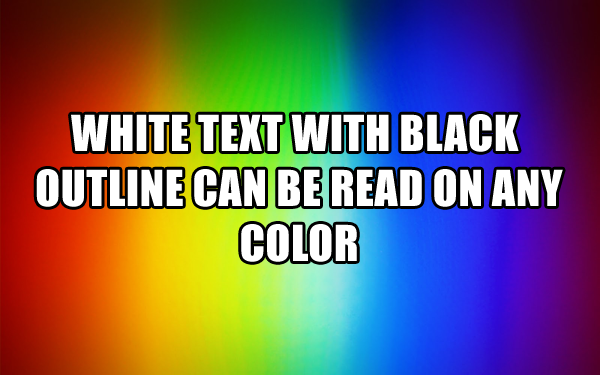
Now that patterns are part of classic shell, I thought I would re-visit the idea of Text shadows to increase legibility, on dynamic backgrounds
 |
|
|
Forum: Start Menu Skins Topic: ASUS K20 Evolution (Win 7 style) |
| Jcee |
|
Posted: Sat Oct 15, 2016 9:17 pm
|
|
Replies: 25
Views: 13788
|
|
|
Forum: Start Menu Skins Topic: Request: Sonic skin |
| Jcee |
|
Posted: Sat Oct 15, 2016 9:12 pm
|
|
Replies: 15
Views: 8819
|
| Because it was hobbled together from this skin http://www.classicshell.net/forum/viewtopic.php?f=17&t=6255&sid=8a36a74be3d64c1b2807a8e9331ddd7b Quite quickly.. Many of the options just flat out break the skin :P Anyways heres your skin (You will need to set a few of the options to how I have... |
|
|
Forum: Start Menu Skins Topic: Request: Sonic skin |
| Jcee |
|
Posted: Fri Oct 14, 2016 4:11 pm
|
|
Replies: 15
Views: 8819
|
| I'd say you're a bigger tails fan :P I am considering this request, but I won't be making it for both styles so which do you prefer? It would also help if you better conveyed what you want it to look like? Sonic standing on a plane background for example like this: http://www.classicshell.net/forum/... |
|
|
Forum: Bug Reports Topic: Windows button not working in Windows 10 |
| Jcee |
|
Posted: Thu Oct 13, 2016 12:22 am
|
|
Replies: 4
Views: 1714
|
As I said, it doesn't sound like classic shell the behavior you describe on the desktop is the same as if you were just pressing the letters.
This means its either a software issue (try the remapper I linked) Or hardware (try a new keyboard) |
|
|
Forum: Classic Start Menu Topic: Switch to Metro screen |
| Jcee |
|
Posted: Tue Oct 11, 2016 1:52 pm
|
|
Replies: 1
Views: 712
|
| Physical functionality? you might be able to re-map the key to another button? right windows, or ` key are good choices https://sharpkeys.codeplex.com/ If you are just looking to get to the metro screen you can set a custom shortcut in classic shell: at the very bottom of the controls tab in Classic... |
|
|
Forum: Feature Requests Topic: Make start at bottom in vertical taskbar |
| Jcee |
|
Posted: Mon Oct 10, 2016 4:33 pm
|
|
Replies: 5
Views: 1951
|
glad it works out. if you want to change the size, edit the .ini file in the zip and change the "H=90" to whatever
To remove the top start button, you can set the start button size to 1 in classic shells settings (or if you don't want that single pixel, create a custom 'clear' start button) |
|
|
Forum: Bug Reports Topic: Windows button not working in Windows 10 |
| Jcee |
|
Posted: Mon Oct 10, 2016 6:06 am
|
|
Replies: 4
Views: 1714
|
| If other win+key related shortcuts aren't working either, it doesn't sound like classic shell is the cause. Does win+e open file explorer? If nothing with the windows key works, it's possible the key was remapped: http://www.majorgeeks.com/files/details/keytweak.html This tool would allow you map it... |
|
|
Forum: Feature Requests Topic: Make start at bottom in vertical taskbar |
| Jcee |
|
Posted: Sun Oct 09, 2016 7:14 pm
|
|
Replies: 5
Views: 1951
|
| Tricking the resolution wont work, nor will making a really tall start button, with the bottom being the only visible part (it will just push down all the other buttons) as for responsiveness.. I actually decided to try it out for myself, and the click appears responsive enough, however there is som... |
|
|
Forum: Feature Requests Topic: Make start at bottom in vertical taskbar |
| Jcee |
|
Posted: Sun Oct 09, 2016 11:43 am
|
|
Replies: 5
Views: 1951
|
| There is currently no easy way to do it. but if you're willing to put in an hour or 2, you could make a 'fake' start button with rainmeter, and on click have it run "C:\Program Files\Classic Shell\ClassicStartMenu.exe" -toggle The Tray/volume/clock/and Notifications will still be on the bo... |
|
|
Forum: Bug Reports Topic: Classic shell does not start automatically windows 8? |
| Jcee |
|
Posted: Wed Oct 05, 2016 5:57 am
|
|
Replies: 9
Views: 2482
|
| Also, some people have reported your issue, and it turned out that they were just referring to the modern start screen appearing at startup, which If i recall can be toggled by right-clicking the taskbar, selecting properties and finding 'show desktop at startup' (I'm not positive because i haven't ... |
|
|
Forum: Feature Requests Topic: Microsoft Windows 10 (B1607) Anniversary Update Clock? |
| Jcee |
|
Posted: Wed Oct 05, 2016 5:54 am
|
|
Replies: 11
Views: 8874
|
| classic shell tends to stay largely focused on the start menu, though it has recently wandered into the realm of the taskbar, those changes are largely cosmetic. If the old clock program still exist somewhere, and IVO stumbles on a simple/safe way to 'toggle' it, then he may include such a feature, ... |
|
|
Forum: Chitchat Topic: Lol what |
| Jcee |
|
Posted: Wed Oct 05, 2016 12:58 am
|
|
Replies: 3
Views: 1550
|
| That is hilarious.. it should (and used to) reduce size of the whole buttons (and taskbar with it) not just the icons. Lets hope they fix it. (though knowing micro-soft they would probably 'fix' it by removing the option |
|
|
Forum: Classic Start Menu Topic: How do I USE Classic Shell now that I've installed it??? |
| Jcee |
|
Posted: Tue Oct 04, 2016 3:18 pm
|
|
Replies: 1
Views: 771
|
| classic shell doesnt replace the entire desktop; it replaces the start menu, and adds a toolbar to the file browser (along with some tweaks for IE) assuming you are referring to the new start button, the first click should bring up the settings, but any clicks after that should bring up the new star... |
|
|
Forum: Start Menu Skins Topic: Windows 10 Start Menu With Emblem Tiles |
| Jcee |
|
Posted: Thu Sep 22, 2016 3:09 am
|
|
Replies: 35
Views: 13827
|
>Don't limit the number of commandments
>There's 9001 commandments
are you even trying? |
|
|
Forum: Feature Requests Topic: Windows-style start menu positioning |
| Jcee |
|
Posted: Fri Sep 16, 2016 12:58 am
|
|
Replies: 13
Views: 4409
|
| If you think about what is said here: [highlight=#dce1e5]You seem to be using a custom theme that may be adding an extra edge to the taskbar. [/highlight] You might realize there is an alternative route to acomplish what you are looking for, IE use classic shell to make the taskbar clear, and then a... |
|
|
Forum: Bug Reports Topic: Minor bug on Win10 14915 |
| Jcee |
|
Posted: Sat Sep 03, 2016 8:41 pm
|
|
Replies: 2
Views: 1355
|
While that doesn't look too bad; it could already be done with a custom task-bar image.. so its not exactly a good thing. Thanks for reporting though.. even if insider builds aren't supported, we need to know the issues as they pop up so we can fix them before the build goes live  |
|
|
Forum: Start Menu Skins Topic: Starcraft Zerg - Skin |
| Jcee |
|
Posted: Sun Aug 28, 2016 10:46 pm
|
|
Replies: 50
Views: 40004
|
| Ok; yea I hadn't thought of the dynamics of windows 7 style when search is used.. it needs to be visually appealing in single column mode (something I was not planning on supporting) though since you specified secondary alignment; and i kinda want to break into the windows 7 style, i guess ill have ... |
|
|
Forum: Start Menu Skins Topic: Starcraft Zerg - Skin |
| Jcee |
|
Posted: Sun Aug 28, 2016 7:09 pm
|
|
Replies: 50
Views: 40004
|
| Yea it sounds like an issue with classic shell, rather than my skin; though its odd that the issue would be with .skin7 because the only official skin to even use emblems is a .skin7 file :P so one would think it would have received more testing than .skin. The stretching sounds intentional. and is ... |
|
|
Forum: Start Menu Skins Topic: Starcraft Zerg - Skin |
| Jcee |
|
Posted: Sun Aug 21, 2016 9:41 pm
|
|
Replies: 50
Views: 40004
|
| Thats an interesting idea, but a floating planet is a loose element. I think I might just go with the idea mentioned previously beside the nameplate (looking at it there is enough room actually) I still need to make a zergish frame though |
|
|
Forum: Start Menu Skins Topic: Starcraft Zerg - Skin |
| Jcee |
|
Posted: Sun Aug 21, 2016 4:22 pm
|
|
Replies: 50
Views: 40004
|
>Put cocoon up here
To what end? a user-picture?
Im not sure if it would be aesthetically sound to do so. Also cocoons are gray and dull and IMO break from the skins design elements. |
|
|
Forum: Start Menu Skins Topic: Starcraft Zerg - Skin |
| Jcee |
|
Posted: Sat Aug 20, 2016 5:34 pm
|
|
Replies: 50
Views: 40004
|
| @.skin7 well the base skin is the metallic so it should have everything needed to work as a .skin7 however I am working on it as a .skin because thats the menu I use. I may attach a .skin7 varriant once i get all the features perfected for the .skin mode :P @juniper7 it was just a comedic idea, that... |
|
|
Forum: Start Menu Skins Topic: Starcraft Zerg - Skin |
| Jcee |
|
Posted: Sat Aug 20, 2016 3:57 am
|
|
Replies: 50
Views: 40004
|
? Thats where the user Name goes. Are you suggesting I put the image next to the name, and make that area bigger? because that could work too
Also I'm sure your aware; but that's the old skin (the new one looks pretty close to the finished product, except without any options working) |
|
|
Forum: Start Menu Skins Topic: Starcraft Zerg - Skin |
| Jcee |
|
Posted: Sat Aug 20, 2016 3:04 am
|
|
Replies: 50
Views: 40004
|
| Heres an update; still very messy, but I think ive just about gotten all the emblems and background added/aligned none of the skin options have even been touched from the base (metalic skin) Though I am brainstorming ideas I briefly thought about imposing the user-picture upon the queen of blades fa... |
|
|
Forum: Start Menu Skins Topic: Windows 10 Start Menu With Emblem Tiles |
| Jcee |
|
Posted: Sat Aug 20, 2016 12:24 am
|
|
Replies: 35
Views: 13827
|
|
|
Forum: Start Menu Skins Topic: Windows 10 Start Menu With Emblem Tiles |
| Jcee |
|
Posted: Thu Aug 18, 2016 8:49 pm
|
|
Replies: 35
Views: 13827
|
| Here's the thing: Links would probably be fairly easy to add to emblems; and it would be useful enough. however its highly unlikely that many users will use emblems in the manner you are suggesting (as tiles), because its simply too complicated for most users to even edit a .skin in reshacker. and r... |
|
|
Forum: Taskbar Skins Topic: How do I make a taskbar skin? |
| Jcee |
|
Posted: Thu Aug 18, 2016 6:12 pm
|
|
Replies: 5
Views: 4048
|
>Its too small to copy to the desktop
Not if you zoom in on your browser Ctrl++ |
|
|
Forum: Classic Start Menu Topic: downloaded classic shell, got digitalprivacyalert.org popup |
| Jcee |
|
Posted: Tue Aug 16, 2016 4:46 pm
|
|
Replies: 2
Views: 1337
|
| I haven't seen the specific issue before but it appears you have some kind of adware, causing the alert. The step-by step provided on the site you linked seems accurate enough, though I cant say if it will work. adware is often stubborn to remove. I would suggest running a virus scan. (I personally ... |
|
|
Forum: Feature Requests Topic: Placing images on start menu & linking them ( win 10 tiles ) |
| Jcee |
|
Posted: Tue Aug 16, 2016 1:00 am
|
|
Replies: 10
Views: 6371
|
| Congratulations; you added an un-clickable picture to the menu :P Sadly there isnt yet a feature to give links to emblems. (though that would be extremely useful for advanced start menu customization) Btw if you play around with the skins padding (look for: Main2_padding=3,10,5,9 in your skin); you ... |
|
|
Forum: Bug Reports Topic: CPU goes to 40% when hovering mouse at bottom-left corner |
| Jcee |
|
Posted: Tue Aug 16, 2016 12:44 am
|
|
Replies: 3
Views: 1241
|
| So your saying that custom buttons prevent this issue? is this just because they are blocking the bottom corner? IE try shrinking a custom button to 10 pixels in the settings, then see if the bottom corner still causes incidence. From the sound of it, it might be windows causing the issue, does the ... |
|
|
Forum: Classic Start Menu Topic: classic shell custom start button not keeping the custom tex |
| Jcee |
|
Posted: Sat Aug 13, 2016 10:53 pm
|
|
Replies: 2
Views: 881
|
Hitting ok should definitely cause the change to persist after restart.
is the file being moved/deleted? do other settings persist after restart? |
|
|
Forum: Chitchat Topic: Windows Mods/Alternatives |
| Jcee |
|
Posted: Fri Aug 12, 2016 8:33 pm
|
|
Replies: 91
Views: 153096
|
| Thanks for the update actually most of these probably work on windows 10; Ill update the origonal post to reflect |
|
|
Forum: Classic Start Menu Topic: Slow, incomplete web page loading |
| Jcee |
|
Posted: Tue Aug 09, 2016 4:21 pm
|
|
Replies: 5
Views: 1446
|
| What browser are you using? the latest dev chrome seems to be acting up for me too.. but internet explorer works just fine (for reference ofcourse) If yours is the same I would just wait it out, or report to the chrome team if you want |
|
|
Forum: Classic Start Menu Topic: Recent hack and new Asus T100 CHi and T100HA. |
| Jcee |
|
Posted: Tue Aug 09, 2016 5:41 am
|
|
Replies: 17
Views: 3606
|
| I can say that it was most certainly the hack. If you recall when you installed it previously, there would have been a UAC prompt warning of an unverified publisher. This is not the case with the legit classic shell, which is digitally signed |
|
|
Forum: Feature Requests Topic: Placing images on start menu & linking them ( win 10 tiles ) |
| Jcee |
|
Posted: Mon Aug 08, 2016 8:44 pm
|
|
Replies: 10
Views: 6371
|
| Its not emblems, its .icons, and can only be achieved on the classic/classic with 2 columns menu.. heres a screenshot of relevant settings |
|
|
Forum: Feature Requests Topic: Hide "Show Desktop" button on taskbar |
| Jcee |
|
Posted: Mon Aug 08, 2016 2:30 pm
|
|
Replies: 1
Views: 1028
|
| because 7+ does it, and a bunch of other things so well. classic shell hasnt felt the need to waste coding time/resources to move in on its territory.. I would love to see everything in 1 app too, but I would also rather have 2 apps, and more features (time wasted on re-creating the features, plus 2... |
|
|
Forum: Feature Requests Topic: Placing images on start menu & linking them ( win 10 tiles ) |
| Jcee |
|
Posted: Mon Aug 08, 2016 2:25 pm
|
|
Replies: 10
Views: 6371
|
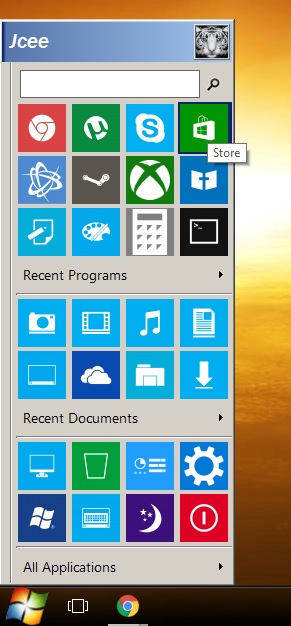
This is as close as your going to get (well you can add a second column to the left or right.
The tiles arent live or resizable, and they are hard-coded (IE a pain to change/move)
 |
|
|
Forum: Bug Reports Topic: Windows 10 removing Classic Shell start menu |
| Jcee |
|
Posted: Sun Aug 07, 2016 5:36 pm
|
|
Replies: 6
Views: 8876
|
|
|
Forum: Classic Start Menu Topic: Is Piriform CCleaner installed with latest version of Shell? |
| Jcee |
|
Posted: Sun Aug 07, 2016 1:26 pm
|
|
Replies: 3
Views: 896
|
| It shouldn't be; Assuming you downloaded from classicshell.net your pc might be infected with something else causing the install. I would recommend a good virus scan |
|
|
Forum: Bug Reports Topic: Windows 10 removing Classic Shell start menu |
| Jcee |
|
Posted: Sun Aug 07, 2016 1:22 pm
|
|
Replies: 6
Views: 8876
|
| It is kinda your problem (I know it shouldn't be) because windows will continue to remove old versions of classic shell for whatever reason, and all we can do is fix the issue on the next version of classic shell. Most programs don't have this problem because they don't root themselves into the expl... |
|
|
Forum: Classic Start Menu Topic: How to change write Windows 10 Pro Version ==1607== |
| Jcee |
|
Posted: Sat Aug 06, 2016 3:03 am
|
|
Replies: 14
Views: 3691
|
Im a little lost on exactly what you mean:
maybe go here:
Control Panel\Appearance and Personalization\Display
and set it higher? |
|
|
Forum: Hack hotline Topic: W10 anniversary update, installed CS4.3 , had to repair OS |
| Jcee |
|
Posted: Sat Aug 06, 2016 12:59 am
|
|
Replies: 99
Views: 167632
|
| Hey all, to those affected by the malware, I just fixed my partition table on my compromised drive using this software: http://www.cgsecurity.org/wiki/TestDisk Restored my partition table completely with no issues. Did a quick scan and then added the found partition back and wrote it to disk. You w... |
|
|
| Sort by: |

 Login
Login Register
 FAQ
FAQ Search
 Members