| Author |
Message |
Forum: Start Buttons Topic: Start button (XP classic one) with custom language |
| Splitwirez |
|
Posted: Tue Jan 05, 2016 8:31 pm
|
|
Replies: 7
Views: 3712
|
Jcee wrote: :P its best to let him try for himself first atleast.. let a man learn to fish and all...
Yeah. I was just saying that I'd do it if that doesn't work out  |
|
 |
Forum: Start Buttons Topic: Start button (XP classic one) with custom language |
| Splitwirez |
|
Posted: Tue Jan 05, 2016 4:15 am
|
|
Replies: 7
Views: 3712
|
Jcee wrote: someone on the forums will likely pick up your request
I'l do it
(no, really, I mean it :3 ) |
|
|
Forum: Feature Requests Topic: A True Classic Explorer, Images, Menu Bar |
| Splitwirez |
|
Posted: Mon Dec 28, 2015 4:55 am
|
|
Replies: 28
Views: 14851
|
| I found the tool a while ago, but many users reported problems if used and I didn't go with it. As for the resource editing, I've found nothing regarding this. Many said that the buttons are hard coded and can't be removed without some repercussions. Actually, I just meant you could make them invis... |
|
|
Forum: Feature Requests Topic: A True Classic Explorer, Images, Menu Bar |
| Splitwirez |
|
Posted: Sat Dec 26, 2015 8:09 pm
|
|
Replies: 28
Views: 14851
|
| I managed to make some of the buttons from 98 usable with Classic Shell, within Windows 7. Tested on Win 10 some time ago and I had no problems. Here's a link of my Windows 7 explorer http://www.deviantart.com/art/Classic-Windows-Explorer-484011281 As for the Adress bar I haven't found a solution t... |
|
|
Forum: Feature Requests Topic: Windows 10 Taskbar skinning workaround? |
| Splitwirez |
|
Posted: Sun Dec 20, 2015 3:53 am
|
|
Replies: 20
Views: 7590
|
| true, its nowhere near as easy to do as a setting in classic shell that you just tick, and its done.. but it can be done, by people with enough drive to do-so Yeah...I'm not worried about learning the rainmter language (I've been considering it regardless, might even help me make a new sidebar and/... |
|
|
Forum: Feature Requests Topic: Windows 10 Taskbar skinning workaround? |
| Splitwirez |
|
Posted: Sat Dec 19, 2015 8:57 pm
|
|
Replies: 20
Views: 7590
|
| Yup, and it remembers its position after restart, the only time it forgets is when your changing monitors around also displayfusion's free version allows you to have separate wallpapers on a monitor by monitor basis ...that doesn't address the problem - I'm more comcerned about making it work well ... |
|
|
Forum: Feature Requests Topic: Windows 10 Taskbar skinning workaround? |
| Splitwirez |
|
Posted: Sat Dec 19, 2015 1:05 pm
|
|
Replies: 20
Views: 7590
|
| If you can already hide the taskbar background, then you could easily modify the desktop wallpaper with a 'fake' task-bar on it.. or take it 1 step further, if you change wallpapers frequently. by making a rainmeter skin that lays where the taskbar should be I used to use the wallpaper hack...probl... |
|
|
Forum: Feature Requests Topic: Dont open menu on [Win] Hold |
| Splitwirez |
|
Posted: Fri Dec 18, 2015 10:23 am
|
|
Replies: 3
Views: 1493
|
| Classic Shell does not access the Win key directly. It hooks into the original start menu/start screen activation. It is not possible to hook the keyboard reliably unless you are running as admin. The start menu runs inside the Explorer process, which is not elevated. Just a thought...does that mea... |
|
|
Forum: Feature Requests Topic: Windows 10 Taskbar skinning workaround? |
| Splitwirez |
|
Posted: Fri Dec 18, 2015 5:35 am
|
|
Replies: 20
Views: 7590
|
| So, as you may or may not know, Windows 10's taskbar does not support Visual Styles anymore. So I had an idea to fix this...what if there was an option to simply hide the taskbar background (already possible) and just draw a user-selected image behind it? In fact, could the same thing be done for th... |
|
|
Forum: Feature Requests Topic: Classic taskbar for windows 10 |
| Splitwirez |
|
Posted: Thu Dec 10, 2015 4:16 pm
|
|
Replies: 18
Views: 12378
|
| I had tried XP explorer on Win7 or Win8 and as I recall, the tray does not work there. Really? How did I not notice that? .-. Hmm...I wonder if Vista's explorer would work better... ...I'll try it now. If I can find it on my Vista disk, that is. EDIT: Vista explorer's tray works!! ...but that's pre... |
|
|
Forum: Feature Requests Topic: Add classic theme support |
| Splitwirez |
|
Posted: Thu Dec 10, 2015 4:14 pm
|
|
Replies: 6
Views: 3163
|
| Why would classicshell be less usable with a fully functional classic mode? Remember that what classictheme does is disabling the theme via a process thread upon starting windows it adds little other tweaks but Ivo figured how to make a startbutton purehaps its not a bad idea if he add context menu... |
|
|
Forum: Feature Requests Topic: Add classic theme support |
| Splitwirez |
|
Posted: Wed Dec 09, 2015 6:02 pm
|
|
Replies: 6
Views: 3163
|
| Last I checked, the whole point of a usability aid like Classic Shell was to make the OS MORE usable, not LESS... |
|
|
Forum: Feature Requests Topic: Classic taskbar for windows 10 |
| Splitwirez |
|
Posted: Wed Dec 09, 2015 11:26 am
|
|
Replies: 18
Views: 12378
|
| Is this XP's explorer? I think it should not be much functional. Yes, it is XP's explorer. The explorer Windows are completely inaccessible, but since it's being launched from a location other than C:\WINDOWS , we still get the explorer windows from Windows 10, and XP's explorer only provides the (... |
|
|
Forum: Feature Requests Topic: Classic Explorer: navigation buttons on the CE panel |
| Splitwirez |
|
Posted: Wed Dec 09, 2015 11:20 am
|
|
Replies: 10
Views: 3819
|
Anixx wrote: Don't you know, where in Windows I can find back and forward buttons used in MMC?
Used in WHAT???
Um...if you want the ones used in stock Windows 7 explorer, you can find them in C:\WINDOWS\system32\explorerframe.dll . That remains true for Windows 8 and 10...for some reason... |
|
|
Forum: Start Menu Skins Topic: Dark Injection 9.r Start Menu |
| Splitwirez |
|
Posted: Wed Nov 25, 2015 11:25 am
|
|
Replies: 82
Views: 41569
|
| well since you won, i see no reason why I cant extend it indefinitely for your re-submission.. :P, since its you who risk loosing the keys ...ugh...and here's where stuff gets awkward: My current situation doesn't really permit me to start playing more games, since I'm too invested in a series of m... |
|
|
Forum: Start Menu Skins Topic: Dark Injection 9.r Start Menu |
| Splitwirez |
|
Posted: Wed Nov 25, 2015 2:43 am
|
|
Replies: 82
Views: 41569
|
Jcee wrote: Ok 
Scratch that, I might not have time to finish my entry this week - lotta stuff going on in the Spore scene ._. |
|
|
Forum: Start Menu Skins Topic: Dark Injection 9.r Start Menu |
| Splitwirez |
|
Posted: Sun Nov 22, 2015 3:04 pm
|
|
Replies: 82
Views: 41569
|
Jcee wrote: There was no agreement from the other 2 participating members, so i made a 'decision'
Since you haven't redeemed, I'm ok with reopening the contest. (pending both participants approval)
Do you have an updated submission?
...working on it ._. |
|
|
Forum: Start Buttons Topic: holiday start buttons |
| Splitwirez |
|
Posted: Sat Nov 21, 2015 1:06 pm
|
|
Replies: 10
Views: 5695
|
| Just made one. I've always thought the new Windows logo looked like one side of a Christmas present :lol: (FYI I have a giant version, 10x the size of this one, so if anyone wants it, I'd be happy to provide (VIA LINK, NOT ATTACHMENT, OFC) :V EDIT: Woops, accidentally chopped off the bottom part of ... |
|
|
Forum: Start Menu Skins Topic: Dark Injection 9.r Start Menu |
| Splitwirez |
|
Posted: Sat Nov 21, 2015 11:43 am
|
|
Replies: 82
Views: 41569
|
...whoa whoa whoa, what happened to extending the deadline? ._.
I haven't redeemed those keys yet, and probably wouldn't have for a while yet, so...um...wait, what was I saying again? |
|
|
Forum: Feature Requests Topic: Taskbar transparency and maximized windows |
| Splitwirez |
|
Posted: Thu Nov 19, 2015 4:35 am
|
|
Replies: 7
Views: 2569
|
| What would be the purpose/functional enhancement of this change? Also note that Android does not have a taskbar that lets you switch directly between running apps, for that it has a task switcher. On Windows, one app can be maximized, other can be windowed, the user can rapidly switch between switc... |
|
|
Forum: Start Menu Skins Topic: [REQUEST] Midnight skin for Classic with two columns. |
| Splitwirez |
|
Posted: Wed Nov 18, 2015 4:36 am
|
|
Replies: 17
Views: 7368
|
Ivo wrote: No, not possible. The way Windows 7 style works does not leave room for showing the user name.
...what about the other parts of the idea? :Y |
|
|
Forum: Start Menu Skins Topic: [REQUEST] Midnight skin for Classic with two columns. |
| Splitwirez |
|
Posted: Tue Nov 17, 2015 11:57 am
|
|
Replies: 17
Views: 7368
|
| The Windows 7 skins has requirements for the layout of the menu, which makes it incompatible with the classic style. You can place the Programs menu or the search box anywhere in the menu, even in a sub-menu if you want. The all programs tree can't work in those cases. Okay, but...what about having... |
|
|
Forum: Start Menu Skins Topic: [REQUEST] Midnight skin for Classic with two columns. |
| Splitwirez |
|
Posted: Mon Nov 16, 2015 4:47 pm
|
|
Replies: 17
Views: 7368
|
Ivo wrote: What is the reverse?
Classic with 2 Columns style skin with Win7-style all programs menu :V
...That'd be a dream-come-true IMO. Probably because Vista had a Start Menu like that for a large portion of its beta phase. So if it included a Vista-esque shutdown button, too... :Q |
|
|
Forum: Feature Requests Topic: "Desktop Integration" Start Menu style? |
| Splitwirez |
|
Posted: Mon Nov 16, 2015 1:54 pm
|
|
Replies: 11
Views: 2937
|
| I think some folder integrated like the Desktop into the main menu which provides direct 1-click access to icons (without any submenu) is a good idea. But it needs to be designed a way that it uses the screen estate horizontally, like the Windows 10 menu. It can be an extension of pinning. Yeah. I ... |
|
|
Forum: Start Menu Skins Topic: [REQUEST] Midnight skin for Classic with two columns. |
| Splitwirez |
|
Posted: Mon Nov 16, 2015 1:52 pm
|
|
Replies: 17
Views: 7368
|
Gaurav wrote: The Windows 7 style also allows for a multi-column All Programs menu. Select the option "Cascading sub-menu" under "All Programs style" on the Main Menu tab.
...is there a way to do the reverse? ._. |
|
|
Forum: Start Menu Skins Topic: Dark Injection 9.r Start Menu |
| Splitwirez |
|
Posted: Sat Nov 14, 2015 9:07 pm
|
|
Replies: 82
Views: 41569
|
juniper7 wrote: Ah, better.
But even if I put to -6 size,
it all looks too squishy on a menu.
Is there an ttf editor that can resize to a better proportion, all at once, quickly?
Yes. Forgot the name, but it's ridiculously expensive, and the free version lacks only one feature: saving .__________. |
|
|
Forum: Start Menu Skins Topic: Dark Injection 9.r Start Menu |
| Splitwirez |
|
Posted: Sat Nov 14, 2015 1:23 pm
|
|
Replies: 82
Views: 41569
|
| I don't know if you want these Splitwirez? I was going to use one of these fonts in my skin, changed my mind. The Space & Nasal looked ok. Just makes the menu super wide. Even a Spore font, a little ragged around the edges though. The font name would need to be put in skin file, as well as putt... |
|
|
Forum: Feature Requests Topic: "Desktop Integration" Start Menu style? |
| Splitwirez |
|
Posted: Sat Nov 14, 2015 12:00 pm
|
|
Replies: 11
Views: 2937
|
| The windows 7 style sadly doesn't allow much modification to the left column. The classic with 2 column style however is far more lenient ;P but aside from having it on the left, and displaying the desktop background, i see no real difference between your proposed, and my solution. Also if you pres... |
|
|
Forum: Feature Requests Topic: "Desktop Integration" Start Menu style? |
| Splitwirez |
|
Posted: Sat Nov 14, 2015 11:27 am
|
|
Replies: 11
Views: 2937
|
| 1. from the customize start menu tab, right click and insert new item; click it and choose desktop. Now you have your desktop in the start menu.. 2. why do you need to see what icons are on your taskbar IN your start menu, when you can already see them.. on your taskbar... 1. It was the integration... |
|
|
Forum: Feature Requests Topic: "Desktop Integration" Start Menu style? |
| Splitwirez |
|
Posted: Sat Nov 14, 2015 9:10 am
|
|
Replies: 11
Views: 2937
|
| Ever find that the desktop is pretty useless once you have more than 3 applications running, since it's a pain to access without disorganizing your ALT+TAB list? Well I have a solution: http://www.mediafire.com/convkey/d2a5/s85fvhyu2pmqzygzg.jpg?size_id=5 The "Desktop Integration" Start Me... |
|
|
Forum: Start Menu Skins Topic: Dark Injection 9.r Start Menu |
| Splitwirez |
|
Posted: Sat Nov 14, 2015 4:28 am
|
|
Replies: 82
Views: 41569
|
| I'm still using the submenu in the picture above. We can both use it. But...it looks the same as my userframe... D: Hey, guys. If you are considering making new skins, I would suggest you wait till tomorrow. There will be a new release with some new skin features. :DDDDDDDDDDDDDDDDDDDDDDDDDDDDDDDDD... |
|
|
Forum: Start Menu Skins Topic: Dark Injection 9.r Start Menu |
| Splitwirez |
|
Posted: Fri Nov 13, 2015 4:56 pm
|
|
Replies: 82
Views: 41569
|
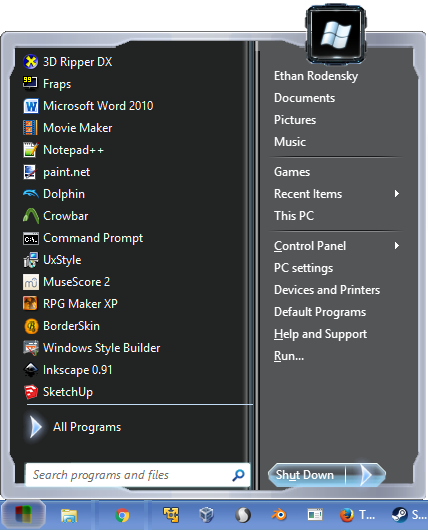
DOWNLOAD
Let me know when I win (or don't) |
|
|
Forum: Start Menu Skins Topic: [REQUEST] Midnight skin for Classic with two columns. |
| Splitwirez |
|
Posted: Fri Nov 13, 2015 9:55 am
|
|
Replies: 17
Views: 7368
|
| No, no reason. Somebody with free time on their hands can make a version of the Midnight skin for the Classic styles. I tired, but failed miserably. So I figured I'd post a request here, and maybe someone with skinning knowledge could piece the color scheme together for a Midnight in the Classic me... |
|
|
Forum: Start Menu Skins Topic: Dark Injection 9.r Start Menu |
| Splitwirez |
|
Posted: Tue Nov 10, 2015 12:09 pm
|
|
Replies: 82
Views: 41569
|
| Looking at the pie folder. I count more than 13 images that can be used as main/sub menus. Basically ready made. Anybody else want to try? We can all help new skinners, with the script text. Namely the splices and the padding. The splices dimension measurement, that says where to stretch, and not t... |
|
|
Forum: Start Menu Skins Topic: Dark Injection 9.r Start Menu |
| Splitwirez |
|
Posted: Mon Nov 09, 2015 6:48 pm
|
|
Replies: 82
Views: 41569
|
| Thanks Jcee. I'm up for the challenge. As for me, if I slap a menu together in a couple of hours, it's gonna look like #rap. I want to spend more time on it, so it looks one step above #rap. I have been working on the main menu. It's totally different looking now. Never know where it's going! Takin... |
|
|
Forum: Start Menu Skins Topic: Dark Injection 9.r Start Menu |
| Splitwirez |
|
Posted: Sun Nov 08, 2015 5:56 am
|
|
Replies: 82
Views: 41569
|
| I would agree, there is no point in limiting anything :P. I would put more weight on overall aesthetics than sticking with a specific theme, so I would say any resources should be fair game. (if they look good in the skin) So lets just say best skin wins (regardless of theme) As for a prize, I've g... |
|
|
Forum: Start Menu Skins Topic: Dark Injection 9.r Start Menu |
| Splitwirez |
|
Posted: Sat Nov 07, 2015 8:54 pm
|
|
Replies: 82
Views: 41569
|
| Jcee I guess. I will keep one arm behind my back, while making it. :) What are the rules? Only use what is in pie folder? You gonna win anyway, as you have the advantage, as to what it all looks like in the game. I might not have all the time in the world for it. Ok. Enough excuses. 7 days to sundo... |
|
|
Forum: Start Menu Skins Topic: Dark Injection 9.r Start Menu |
| Splitwirez |
|
Posted: Sat Nov 07, 2015 7:58 pm
|
|
Replies: 82
Views: 41569
|
| I'll wait for a week to see if others are interested. If no one up to challenge, we can dual it out, and complete one each? :) Got a feeling Windows 10 users are becoming tolerant of original menu. I don't know. Are menu skinning days over for most? Sure wish I had been interested in skinning 5 to ... |
|
|
Forum: Start Menu Skins Topic: Dark Injection 9.r Start Menu |
| Splitwirez |
|
Posted: Sat Nov 07, 2015 2:58 pm
|
|
Replies: 82
Views: 41569
|
| It's your treasure chest. All yours for the making. I never made a skin. Just put those two bitmaps together, to see what it looked like. I can help out, when you get stuck with something. ...oh... ... ._______________. well I'm that one guy who'd choose to share the stuff, if anyone's interested, ... |
|
|
Forum: Start Menu Skins Topic: Dark Injection 9.r Start Menu |
| Splitwirez |
|
Posted: Sat Nov 07, 2015 12:59 pm
|
|
Replies: 82
Views: 41569
|
| Wow, Splitwirez. I just opened that pie_menu folder. You hit the motherlode. There is potential to make all kinds of menu skins. Edit: Removed off color picture. Sorry about that. Here is a better picture, the submenu. Well then, I sure am glad I uploaded that folder :lol: ...uh...are you going to ... |
|
|
Forum: Feature Requests Topic: A True Classic Explorer, Images, Menu Bar |
| Splitwirez |
|
Posted: Sat Nov 07, 2015 12:51 pm
|
|
Replies: 28
Views: 14851
|
| *sigh* I'm just going to disregard the odds of this actually happening, and post my "what if" concepts: http://www.mediafire.com/convkey/fe22/ks2ci8jrzg3rc8qzg.jpg?size_id=8 OR http://www.mediafire.com/convkey/70b4/eaogjadefn1euthzg.jpg?size_id=8 Now imagine that with Visual Styles. |
|
|
Forum: Start Menu Skins Topic: Dark Injection 9.r Start Menu |
| Splitwirez |
|
Posted: Fri Oct 23, 2015 9:42 am
|
|
Replies: 82
Views: 41569
|
| Quite nice overall, I really like the silver bars on top/bottom, but if your looking for ideas to clean this up: The new programs color is yellow (making it something darker, would make the text more legible) The top bar feels kinda out of place, (maybe its just to transparent for my taste?) Also t... |
|
|
Forum: Start Menu Skins Topic: Dark Injection 9.r Start Menu |
| Splitwirez |
|
Posted: Fri Oct 23, 2015 6:20 am
|
|
Replies: 82
Views: 41569
|
| http://www.mediafire.com/convkey/9a18/tb6r2jsaivqfro5zg.jpg?size_id=6 Need I say more? :mrgreen: Actually, I probably do. This skin is based on the user interface design from a mod for a game called Spore. The mod ports the UI, among many other things, from another slightly related game, Darkspore.... |
|
|
Forum: Feature Requests Topic: Expanding classic shell to also edit context menus? |
| Splitwirez |
|
Posted: Fri Oct 23, 2015 3:12 am
|
|
Replies: 6
Views: 2533
|
| Absolutely, Check out the context menu's for the high contrast themes that come bundled with windows for a proof of concept ;P Now Finding a skin with everything you want is a different matter... I'd offer to modify those menus myself...except that's the only part of a Visual Style I don't know how... |
|
|
Forum: Start Buttons Topic: Windows Longhorn Build 4039 New Taskbar Classic Theme Button |
| Splitwirez |
|
Posted: Thu Oct 22, 2015 3:09 am
|
|
Replies: 0
Views: 2738
|
Here you have it, the laughing stock of the Longhorn UX legacy
 |
|
|
Forum: Feature Requests Topic: Classic taskbar for windows 10 |
| Splitwirez |
|
Posted: Sat Oct 17, 2015 10:25 am
|
|
Replies: 18
Views: 12378
|
| It wont work i have turned off the theming with classictheme while there were no problems with the taskbar in windows 8 the problems happen when i use ibmpads classictheme that completely disables theming . Windows 10 does not turn off themes on taskbar and messes up context menus thus why we need ... |
|
|
Forum: Feature Requests Topic: Classic taskbar for windows 10 |
| Splitwirez |
|
Posted: Wed Oct 14, 2015 12:23 pm
|
|
Replies: 18
Views: 12378
|
| Taskbar can't be skinned in Windows 10. Try killing Windows 10's explorer, and using XP's or Vista's from a DIFFERENT location. This will only affect the taskbar, since explorer windows are always opened from C:\WINDOWS. Note that both XP's and Vista's start menus don't work on Windows 8 or later, s... |
|
|
Forum: Start Menu Skins Topic: [JOKE] Bloated Aero! (Because regular Aero isn't big enough) |
| Splitwirez |
|
Posted: Mon Oct 12, 2015 5:29 am
|
|
Replies: 9
Views: 5704
|
| Just looked. Male from Bangladesh, 8 years and running. He is in a league of his own. His stuff is so excellent. Case and pineapple :lol: (Or case and point, if you wish for my words to actually make sense) I didn't download her/his theme yet, or the BorderSkin, or yours. It was Uxstyle theme patch... |
|
|
Forum: Start Menu Skins Topic: [JOKE] Bloated Aero! (Because regular Aero isn't big enough) |
| Splitwirez |
|
Posted: Sun Oct 11, 2015 3:04 pm
|
|
Replies: 9
Views: 5704
|
| I don't know what caption buttons are. Is that the joke? The outside colored fat border looks nice. Caption buttons are the _ |=| X in the top right corner of each window. The joke is that they're still huge and uniform in size, like those in Windows 10 :lol: Be carefull with some of the links in t... |
|
|
Forum: Start Menu Skins Topic: [JOKE] Bloated Aero! (Because regular Aero isn't big enough) |
| Splitwirez |
|
Posted: Sun Oct 11, 2015 4:04 am
|
|
Replies: 9
Views: 5704
|
| This all started as a flaw in Sagorpirbd's Windows 7 Aero for Windows 10 Visual Style. The caption buttons didn't look quite right to me, but I thought they were hilarious for some reason, and so I ported them to BorderSkin. Then, I decided to create a Start Menu skin and Button to match. Not sure w... |
|
|
| Sort by: |

 Login
Login Register
 FAQ
FAQ Search
 Members